Custom Business Systems for South African Businesses

When Your Business No Longer Fits the Software

We design custom business systems, web applications and portals around the way your operation actually works.

If important processes are spread across spreadsheets, emails, forms, messaging apps and disconnected software, the problem may no longer be a single task that needs automating. You may need one system that brings the process together.

That does not mean rebuilding everything from scratch. We look at what should be kept, what can be integrated and what genuinely needs to be custom-built.

South Africa is our primary market, but custom systems can also be designed, developed and supported remotely for businesses abroad.

What Is a Custom Business System?

A custom business system is software designed around a specific organisation’s operational requirements rather than a predefined set of features intended for thousands of unrelated businesses.

It might be an internal web application used by employees, a customer portal, an operational management system, a CRM-style platform or a system that combines several processes into one environment.

A custom system can bring together:

  • Users and role-based access
  • Forms and structured data capture
  • Business records and databases
  • Workflow automation
  • Approvals and task management
  • Dashboards and KPIs
  • Document and report generation
  • Customer or employee portals
  • Notifications and communications
  • Integrations with other systems

The result is not simply a collection of features. It is a working environment designed around how information and work need to move through the business.

One Process. Five Different Tools.

An employee completes a spreadsheet.

Someone emails it to a manager.

The manager approves it through email.

Another employee updates a separate system.

Management builds a report from the information later.

A custom system can potentially bring those stages into one controlled workflow with one source of information.

When Does Custom Software Make Sense?

Custom software is not automatically better than off-the-shelf software. The question is whether the existing options fit the process well enough.

Your Process Is the Differentiator

If the way your business operates is genuinely different, forcing the process into generic software may remove some of the advantage you have built.

Important Work Lives in Spreadsheets

Spreadsheets are useful tools, but complex multi-user operations eventually need permissions, controlled records, workflows and structured interfaces that spreadsheets were not designed to provide.

Too Many Systems Are Involved

If employees constantly move between several platforms just to complete one process, a connected business system may provide a simpler working environment.

You Keep Working Around Your Software

If employees rely on side spreadsheets, WhatsApp messages and undocumented manual steps because the main system cannot handle the real process, the software may no longer fit the operation.

You Need More Control

Custom systems can be designed around specific roles, permissions, approval points, audit requirements and business rules rather than accepting whatever controls a generic product provides.

The Manual Cost Has Become Significant

Custom development becomes easier to justify when the existing process consumes substantial staff time, creates recurring errors or limits the organisation’s ability to operate efficiently.

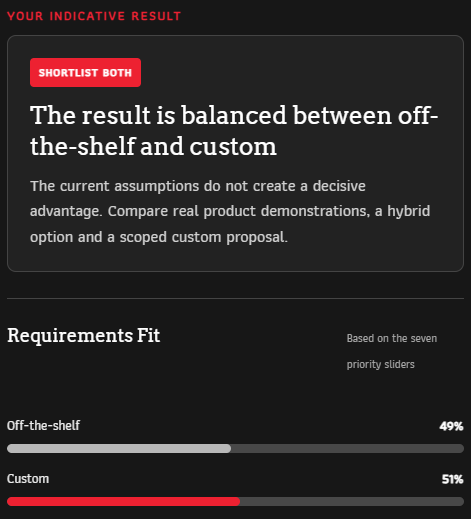
Off the shelf vs Custom Software Calculator Snapshot

THE SOFTWARE DECISION

Custom Software Is Not Always the Right Answer

If an existing product already solves the problem well, building a custom replacement may waste money and create unnecessary maintenance.

On the other hand, a low subscription price can become expensive when staff spend years working around missing functionality, entering the same information repeatedly or changing a good business process to accommodate unsuitable software.

We look at both options. Sometimes the answer is an existing product. Sometimes it is custom software. Often it is a combination: keep proven tools where they work and build only the parts the business genuinely needs.

COMPARE OFF-THE-SHELF VS CUSTOM SOFTWARE

What Can a Custom Business System Include?

The combination depends on the process. A system may use only a few of these capabilities or bring several together into one application.

Forms & Data Capture

Collect structured information from employees, field teams, customers or other users with validation, conditional logic, uploads and appropriate access controls.

Workflow Automation

Move work between users and stages automatically through approvals, notifications, assignments, reminders and other defined process rules.

Dashboards

Give authorised users live visibility into KPIs, work status, exceptions and other operational information without manually compiling updates.

Automated Reports

Generate and distribute structured PDF, Word, Excel or other reporting outputs from information already held inside the system.

User & Role Management

Create different experiences and permissions for administrators, managers, employees, customers or other user groups.

Customer or Employee Portals

Give users a secure central place to submit information, track progress, access documents or interact with defined business processes.

System Integrations

Where suitable technical access exists, connect the system with other software, databases, APIs or services used by the organisation.

AI Capabilities

Where the use case justifies it, AI can be incorporated for tasks such as classification, summarisation, search, document processing or decision support.

The Value Is Often in What Happens Between the Features

A form, dashboard and report can each be useful on their own.

The bigger operational improvement often happens when they form part of the same process.

For example:

Employee submits inspection → system validates information → score calculated → serious issue escalated → manager sees dashboard update → corrective action assigned → formal report generated → complete history remains attached to the record.

No single feature is the system.

The system is the way those pieces work together around the business process.

Capture → Process → Control → Act → Report

Capture
Get the right information into the system.

Process
Apply calculations, automation and business rules.

Control
Use permissions, approvals and defined responsibilities.

Act
Assign work, escalate problems and move the process forward.

Report
Give users live visibility and create formal records when required.

Examples of Custom Business Systems We Can Build

These are examples rather than fixed products. The functionality and structure would depend on the actual business requirements.

Customer Portals

Give customers secure access to information, requests, documents, forms, service updates or other parts of the relationship relevant to them.

Internal Operations Systems

Bring recurring processes, records, approvals, tasks and management information into one environment used by the operational team.

CRM & Lead Management Systems

Manage prospects, interactions, follow-ups, sales stages and related workflows where generic CRM products do not fit the way the business sells.

Ticketing & Service Systems

Receive requests, assign responsibility, track status, manage deadlines and maintain a history of support, maintenance or internal service work.

HR & Employee Systems

Manage employee information, onboarding, documents, leave, internal requests and other people-related processes in one controlled environment.

Compliance & Audit Systems

Capture inspections or assessments, calculate results, assign corrective actions, monitor outstanding issues and produce formal reporting records.

Training & Learnership Systems

Manage registrations, learners, programme activity, assessments, documents, progress and reporting across a structured training process.

Project & Task Systems

Coordinate work, responsibilities, deadlines, status and supporting information where a generic project-management tool does not provide the required process.

Inventory & Asset Systems

Track stock, equipment, allocation, movement, status and related operational activity according to the organisation’s specific requirements.

Event & Registration Systems

Manage registrations, confirmations, attendance, communications, records and other event workflows through one connected process.

Custom Management Platforms

Combine several operational functions into one system where the business does not fit neatly into a standard CRM, ERP, project-management or other software category.

How We Approach Custom System Development

Development should not start with a list of features. It should start with the operation the software needs to support.

1. Understand the Operation

We map the users, processes, information, problems and outcomes involved before deciding what the system needs to contain.

2. Decide What Should Be Custom

We assess what can remain in existing platforms, what can be integrated and what genuinely needs purpose-built functionality.

3. Design the System

Roles, records, screens, workflows, permissions, integrations, reports and other requirements are structured around how the system will actually be used.

4. Build & Test

The system is developed and tested against real processes, permissions, expected scenarios and exceptions rather than only checking whether individual buttons work.

5. Deploy & Prepare Users

The system is introduced into the working environment with the appropriate user access, documentation and training required for adoption.

6. Support & Evolve

Business systems rarely remain completely unchanged. Features, workflows and integrations can be refined as requirements develop.

Custom Does Not Mean Starting From Zero

There is little value in rebuilding functionality that an established platform already provides well.

A custom system can use a combination of purpose-built functionality, existing software, APIs and other suitable technologies.

For example, a business might keep its existing accounting platform but build a custom operational system around it. Employees work inside the environment designed for their process while relevant information moves to or from the accounting system where appropriate.

This hybrid approach can reduce unnecessary development while still solving the parts of the operation that generic software does not handle well.

The objective is not to maximise the amount of custom code. It is to create the most appropriate working system.

Three Possible Answers

Use off-the-shelf software
When an existing system already fits the requirement well.

Integrate existing systems
When the tools work individually but need to share information or processes.

Build custom
When the operation genuinely requires functionality or workflows that available products do not provide adequately.

Sometimes the right solution uses all three.

Specialist Capabilities Inside the Wider System

A custom business system can incorporate several of our specialist services where the process requires them.

Workflow Automation

Automate repetitive movement, notifications, approvals and actions within or between business processes.

AUTOMATION SERVICES

Data Capture

Build structured forms and data collection into the system where information needs to enter from employees, customers or field teams.

DATA CAPTURE

Live Dashboards

Give users ongoing visibility into operational activity, KPIs, trends and exceptions using the information already held by the system.

LIVE DASHBOARDS

Automated Reporting

Turn system data into scheduled, event-driven or on-demand reports without rebuilding documents manually.

REPORTING SERVICES

Frequently Asked Questions

It is software designed around the specific processes, users, information and requirements of an organisation rather than relying entirely on the predefined workflows of a mass-market product.

Not necessarily. If an existing product solves the problem well, using it may be faster and cheaper. Custom development becomes more useful when important requirements cannot be met adequately without significant workarounds or disconnected processes.

Often, yes, where those systems provide suitable APIs, integrations or other technical access. Integration options depend on the platforms involved and their security and technical limitations.

Yes, where spreadsheets are being used as operational databases or multi-user process-management tools. The replacement can provide structured records, user access, workflows and reporting while retaining spreadsheet exports where they remain useful.

Yes. Systems can be designed with role-based access so that administrators, managers, employees, customers or other users see and perform only the functions appropriate to them.

Yes, where appropriate. Workflow automation can handle predictable actions and AI can potentially support tasks such as document interpretation, summarisation or internal assistance where the use case justifies it.

Your business data remains your data. Ownership and responsibilities relating to the application itself, hosting, third-party software and other project components should be defined clearly as part of the project agreement.

Depending on the project, Repautomate can provide hosting, maintenance, support, user training, documentation and ongoing development as the system evolves.

Hosting & Deployment Options

Custom systems can have very different infrastructure requirements depending on the application, number of users, integrations, storage requirements and security needs.

Depending on the solution, deployment may involve infrastructure managed by Repautomate, your own environment or another suitable hosting arrangement.

View Hosting & Deployment Options to learn more.

Start With the Problem, Not the Software

Show us how the work happens today, what is causing friction and which systems are already involved. We can help determine whether the answer is integration, automation, custom development or a combination.

Related Glossary Terms

Automation, Workflow Automation, API, Data Pipeline, Low-Code, No-Code