

 Automation
 AI Integration
 Custom Business Systems
 Web Development & Hosting
 Resource Hub
Many South African businesses are interested in AI, but the real question is not whether AI is powerful. The real question is whether it can be made useful inside the way your business already works, that is where AI system integration matters.
For many businesses, work is still spread across emails, spreadsheets, WhatsApp messages, paper forms, disconnected apps, and manual follow-ups. This creates delays, duplicated admin, poor visibility, and reporting that takes too long to prepare. AI can help, but only when it is connected to the right workflows, data, systems, and people.
AI system integration is not about adding another tool to your business. It is about improving how information moves through your business, how tasks are handled, how reports are created, and how decisions are supported.
Used properly, AI can reduce repetitive admin, improve communication, support faster reporting, and help teams focus on higher-value work. Used poorly, it becomes another disconnected system that staff have to manage.
Prefer to watch or listen?
Get a comprehensive overview of the article’s key insights by playing our summary video.
Disclaimer: This video is an automated summary generated using NotebookLM by Google based on the original article text. While it provides an accurate overview of the key themes, please refer to the full original article for complete details and context.
From AI Idea to Working Business System
Understanding where AI could help is only the first step. The harder part is connecting it to the systems, information and workflows the business already relies on, while deciding what the AI should be allowed to do and where people still need to remain involved.
Repautomate provides AI integration services for South African businesses, covering the practical implementation of AI within existing business processes as well as considerations around data access, governance, human oversight and user adoption.
The goal is not simply to introduce another AI tool. It is to build a working process around it so that the technology has a defined role inside the business.
What AI system integration means
AI system integration means connecting AI capabilities to your existing business processes and digital systems. Instead of using AI as a separate tool, the AI becomes part of a controlled workflow.
For example, a staff member might submit an incident report through a form. AI can help structure the report, identify missing information, categorise the issue, and prepare a clear summary for a manager or client. The system can then route the report to the right person, update a dashboard, store the record, and trigger the next step.
That is very different from asking someone to copy information into an AI tool, wait for an answer, copy the answer back into another system, and then manually follow up with the next person.
Proper integration removes friction. It helps AI support the work without creating more work.
In practice, AI system integration may involve forms, portals, workflow automation, dashboards, reporting systems, document processing, customer communication, internal approvals, CRM updates, or data analysis. The technology behind the scenes may vary, but the purpose should always be clear: better control, better visibility, and less repetitive admin.
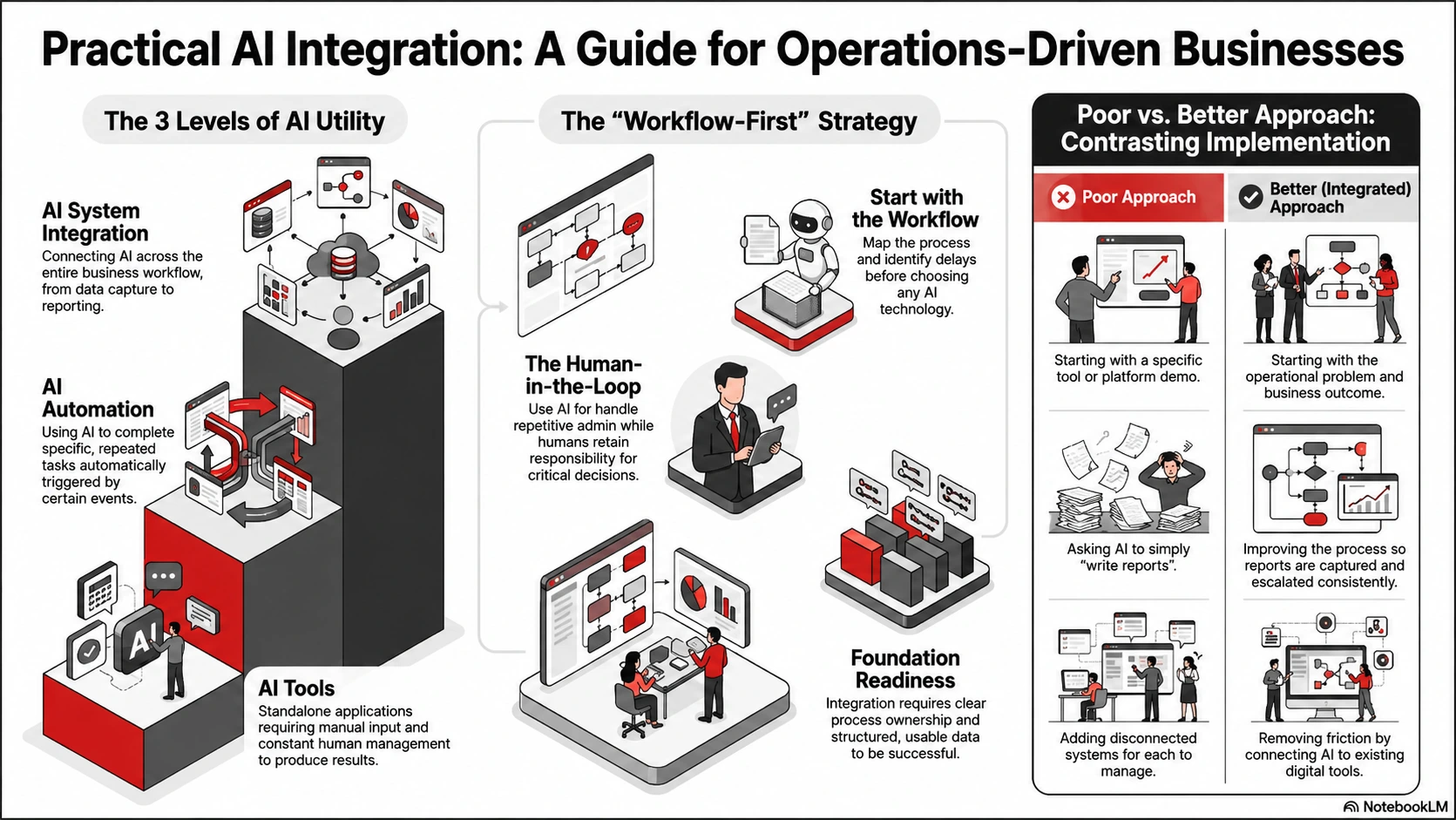
AI tools, AI automation, and AI system integration are not the same thing
A lot of confusion comes from the way AI is discussed. Many businesses hear about AI tools, AI automation, and AI integration as if they are the same thing. They are related, but they solve different problems.
An AI tool is usually something a person uses directly. ChatGPT is a simple example. A team member can ask it to summarise text, draft an email, analyse information, or explain something. This can be useful, but the work still depends on a person opening the tool, entering the right information, checking the result, and deciding what to do next.
AI automation goes a step further. It uses AI to complete or support a repeated task automatically. For example, AI could classify incoming enquiries, extract data from a document, or draft a response when a certain trigger happens.
AI system integration goes further again. It connects AI into the wider business process. The AI does not just produce an output. It fits into a system where information is captured, checked, routed, reported on, and acted on.
This distinction matters because many businesses do not need “more AI.” They need better systems that use AI in the right places.
Where AI integration creates real value
AI is most useful when it supports repeated work that takes time, creates admin pressure, or depends on information being handled correctly.
This is why operations-driven businesses are often good candidates for AI integration. These businesses usually have recurring workflows, field teams, reporting requirements, client communication, job cards, approvals, inspections, incidents, or compliance checks.
In those environments, the value is not only in producing text faster. The value is in making sure the right information reaches the right person at the right time, with less manual chasing and fewer gaps.
For example, AI can help a facilities business summarise job card notes, but the bigger benefit is connecting those notes to proof of work, status updates, client communication, and management reporting. AI can help a security company prepare an incident summary, but the bigger benefit is making sure the incident is logged, escalated, reviewed, and visible to management.
The best AI integrations improve the flow of work. They do not just make one task look more advanced.
Common business problems AI integration can help solve
AI system integration can support a range of operational problems, especially when those problems involve repeated communication, manual reporting, or scattered information.
One common issue is slow reporting. Many businesses still rely on someone pulling information from different places, cleaning it up in Excel, writing a summary, and sending it after the fact. AI can help prepare summaries and highlight key information, but only if the reporting process and source data are structured properly.
Another common issue is inconsistent communication. Client updates, internal handovers, and status reports often depend on how clearly one person writes or how much time they have available. AI can help standardise updates, but the business still needs rules around what should be communicated, when, and to whom.
A third issue is weak follow-through. Tasks may be discussed in messages or emails, but there is no central place to see what has been assigned, what is overdue, and what has been completed. AI can help identify actions or summarise requests, but it should be connected to a workflow that tracks responsibility and progress.
AI can also help with document-heavy processes. It can extract key details from forms, reports, PDFs, inspection notes, or customer requests. This can reduce manual capture, but it needs careful review when the information is sensitive, high-risk, or business-critical.
Good AI integration versus poor AI integration
Poor AI integration usually starts with the tool. Someone sees an impressive demo, signs up for a platform, and then tries to force it into the business. The result is often more confusion. Staff are unsure when to use it, managers do not trust the output, and the AI does not connect properly to the systems where work actually happens.
Good AI integration starts with the workflow. The business first identifies the process that needs improvement. Then it looks at what information enters the process, who handles it, where the delays happen, what is repeated manually, what needs to be checked, and what outcome the business needs.
Here is a simple example:
A poor approach would be: “Let’s use AI to write incident reports.”
A better approach would be: “Let’s improve the incident reporting process so reports are captured consistently, missing information is flagged, summaries are prepared faster, clients receive clearer updates, and management can see incident trends.”
The second version gives AI a proper role inside a business process. That is where the value sits.
AI is not always the right tool
Not every workflow needs AI. In many cases, a simple automation, better form, clearer approval process, or live dashboard will solve the problem more reliably and affordably.
AI is useful when the work involves language, judgement support, classification, summarisation, document interpretation, or pattern recognition. For example, AI may help summarise an incident report, classify a customer request, or extract key details from a document.
Automation is often better when the process is rule-based and predictable. For example, sending a reminder, updating a task status, routing a form submission, creating a job card, or notifying a manager may not need AI at all.
The important question is not “how can we use AI?” The better question is “what is the right tool for this workflow?”
A good integration approach should be honest about that. Sometimes AI is useful. Sometimes automation is enough. Sometimes the process needs to be cleaned up before either one will work properly.
What should not be automated with AI too quickly
Not every process should be automated immediately, and not every AI output should be trusted without review.
Businesses should be careful with decisions that affect employment, finance, legal matters, safety, security, compliance, or sensitive personal information. AI can support these areas by organising information, summarising documents, or flagging possible issues, but a person should remain responsible for review and decision-making.
It is also risky to automate a process that is not properly understood. If the team cannot clearly explain how a workflow should happen, AI will not fix that. It may simply speed up a messy process.
A good rule is to use AI first where the task is repetitive, the risk is manageable, the output can be checked, and the benefit is easy to measure. Once the business has confidence, AI can be introduced into more complex workflows with stronger controls.
What needs to be in place before AI works well
AI works best when the operational foundation is clear. This does not mean your business needs perfect systems before starting, but there are a few basics that make integration much more successful.
The first is a clear process. You need to know what should happen when a request, report, job, issue, or enquiry enters the business. Who owns it? What information is required? What happens next? When should it be escalated? Where should the final record live?
The second is usable data. If information is incomplete, duplicated, outdated, or spread across too many places, AI will have limited value. Part of the integration work may involve improving how information is captured and structured before AI is added.
The third is human review. AI can support the work, but your business still needs control. For many workflows, the best model is not full automation. It is AI-assisted work, where the system prepares, checks, summarises, or recommends, and a person reviews the important outputs.
The fourth is responsible data handling. South African businesses need to think carefully about privacy, access control, client information, employee information, and internal documents. AI should be implemented with clear rules about what data it can access, who can use it, where information is stored, and who is accountable for the final output.
A practical AI integration readiness checklist
Before investing in AI system integration, it helps to assess whether your business has a good starting point.
A useful first project usually has these qualities:
- The workflow happens often.
- The current process creates repeated admin.
- Information is being copied, chased, retyped, or manually summarised.
- Delays or errors have a visible business impact.
- The process has clear owners.
- The output can be checked by a person.
- The result can be measured.
- The team will actually use the improved process.
If a process meets most of these criteria, it may be a good candidate for AI integration.
For example, if your team spends hours every week turning site reports into client updates, that is a strong use case. If managers are constantly chasing job status updates, that may also be a strong use case. If customer enquiries arrive through multiple channels and nobody has a clear view of response times, that could be another practical starting point.
The point is to start where the pain is real and the improvement will be visible.
Practical examples of AI system integration
These examples are illustrative, but they show how AI can support real business operations when it is integrated properly.
Incident reporting and escalation
A security, estate, or facilities business may receive incident details from guards, supervisors, site managers, residents, or clients. Without a proper system, those details may be scattered across WhatsApp messages, emails, photos, and spreadsheets.
An AI-supported workflow could help structure the incident report, identify missing details, categorise the issue, prepare a clearer summary, notify the correct manager, and update a reporting dashboard. The value is not only faster writing. The value is cleaner reporting, stronger escalation, and better visibility.
Job cards and proof of work
Field teams often complete work across multiple sites. The admin around this can become messy when notes, photos, approvals, time logs, and customer updates are handled in different places.
AI can help summarise job notes, extract important details, flag incomplete submissions, and prepare status updates. But the system still needs to manage the full workflow: job creation, assignment, progress tracking, completion, review, approval, and reporting.
This is where AI becomes part of an operational system, not just a writing assistant.
Management reporting
Many businesses still rely on manual reporting. Someone exports data, cleans spreadsheets, writes summaries, and sends updates once the work is already done.
AI can help generate plain-language summaries, identify trends, and highlight unusual patterns. But it is only useful if the underlying data is captured consistently. A better reporting process may need smart forms, structured databases, dashboards, and automated updates before AI is added.
Once the foundation is in place, AI can help managers understand what is happening faster and act sooner.
How to choose the right AI integration partner
A good AI integration partner should not start by selling you a platform. They should start by understanding how your business works.
They should ask about your workflows, reporting problems, communication gaps, approval processes, data capture, team responsibilities, and management visibility. They should be able to explain where AI adds value, where simpler automation is enough, and where the process itself needs to be improved before adding more technology.
The right partner should also be honest about risk. AI is useful, but it is not suitable for every task. A responsible implementation partner will build in human review, access control, privacy considerations, and practical training.
Most importantly, they should connect the work back to business outcomes. Less admin. Faster reporting. Better follow-through. Clearer communication. Better visibility across teams, sites, or workflows.
That is what makes AI integration commercially useful.
How Repautomate approaches AI system integration
Repautomate helps operations-driven businesses improve reporting, communication, workflow control, and visibility through practical digital systems.
AI is one part of that work. It is not the whole story.
We start by understanding the operational problem. That may be slow reporting, repeated admin, scattered communication, poor handovers, unclear accountability, or limited management visibility. From there, we design the right system around the workflow.
Depending on the need, that system may include smart forms, workflow automation, dashboards, portals, internal tools, AI-assisted reporting, document processing, integrations, and team training.
The goal is not to make your business look more technical. The goal is to make the work easier to manage, easier to track, and easier to act on.
A sensible first step
If your business is exploring AI system integration services in South Africa, the best first step is to choose one workflow worth improving.
Look for a process where time is being lost, information is being repeated, reports are taking too long, communication is inconsistent, or managers do not have enough visibility.
Then map the process properly. Identify what information enters the workflow, who handles it, where delays happen, what gets copied manually, what needs to be reviewed, and what outcome the business needs.
Only then should AI be added, that is how AI becomes useful. Not as a disconnected tool, but as part of a practical system that improves the way work gets done.
FAQs
AI system integration services connect AI tools to your business workflows, systems, and data. This allows AI to support practical tasks such as reporting, document processing, communication, workflow routing, summaries, alerts, and decision support.
AI automation uses AI to complete or support a specific task. AI system integration connects that AI-supported task into the wider business process, including data capture, routing, reporting, review, communication, and follow-through.
A good first project is a repeated process with clear pain and measurable value. Examples include incident reporting, job cards, client updates, document processing, approval workflows, customer enquiry routing, or management reporting.
In most business workflows, AI should support staff rather than replace them. It can reduce repetitive admin, prepare summaries, structure information, and speed up reporting, while people remain responsible for review, judgement, client relationships, and important decisions.
Repautomate helps identify the right workflow, design the supporting system, connect the necessary tools, apply AI where it adds real value, and train your team to use the improved process properly.