

 Automation
 AI Integration
 Custom Business Systems
 Web Development & Hosting
 Resource Hub
Most small businesses open Outlook, Powerpoint, Word and Excel, and stop there, missing time‑saving apps that are already included in every Microsoft Business Basic or Standard plan.
Below we’ve highlighted 8 highly underused Microsoft gems, some simple actions you can try today to get the ideas flowing, and a quick note on how Repautomate can train your team or even build the whole system for you.
Prefer to watch or listen?
Get a comprehensive overview of the article’s key insights by playing our summary video.
Disclaimer: This video is an automated summary generated using NotebookLM by Google based on the original article text. While it provides an accurate overview of the key themes, please refer to the full original article for complete details and context.

1. Microsoft Lists: Smart trackers in a click
Spin up issue logs, asset registers or onboarding check‑lists with built‑in colour coding and reminders. Start from a template—no formatting headaches—and share the live list in Teams so everyone sees the same status bar.

2. Microsoft Forms: Easy surveys & quizzes
Drag‑and‑drop questions, turn on skip logic so people only see what matters, and watch answers turn into auto‑generated charts the moment they hit “Submit.”

3. Microsoft Planner: Visual task boards
Plan on a Kanban board today; switch to Timeline (Gantt) view tomorrow without moving a single card. Premium adds dependencies and status snapshots for bigger projects. All of it lives inside Teams chat.

4. Microsoft Sway: Beautiful web stories
Drop in text, pictures or video and Sway turns them into a scrolling mini‑site that looks great on any phone or laptop—perfect for proposals, newsletters or reports. Share with a simple link; update anytime.

5. Microsoft Bookings: Self‑serve scheduling
Clients pick an open slot, get automatic reminders, and join via a pre‑made Teams link. Bookings checks your Outlook calendar first, so double‑booking is impossible.

6. Microsoft Whiteboard: Shared sketch pad
An infinite canvas for quick brainstorms or long‑term planning. Add sticky notes, draw, or paste screenshots while everyone edits together inside Teams or a browser.

7. Microsoft Loop: Live blocks that stay in sync
Create a table, checklist or ideas list once; the same block stays updated in Outlook, Teams and Word. No more copy‑paste chaos.

8. Power Automate: Hands‑free workflows
Power Automate is the hidden super‑power you’ll get instant, and exponential, value from.
Simply put, it lets you connect any of your Microsoft apps (plus 1 000+ third‑party services via pre‑built connectors) so data moves automatically between them. Automation is the glue of software.
Picture this: an invoice hits your inbox and, without a click, your spreadsheet updates, your finance channel pings, and a reminder task appears. Imagine the hours that saves over a month!
With Microsoft 365 Business Basic you already have capacity for about 6 000 automated actions per user every day, and you can scale up to 40 000 per user on a Premium licence when your flows really take off.
Not sure where to start? Automation happens to be our specialty.
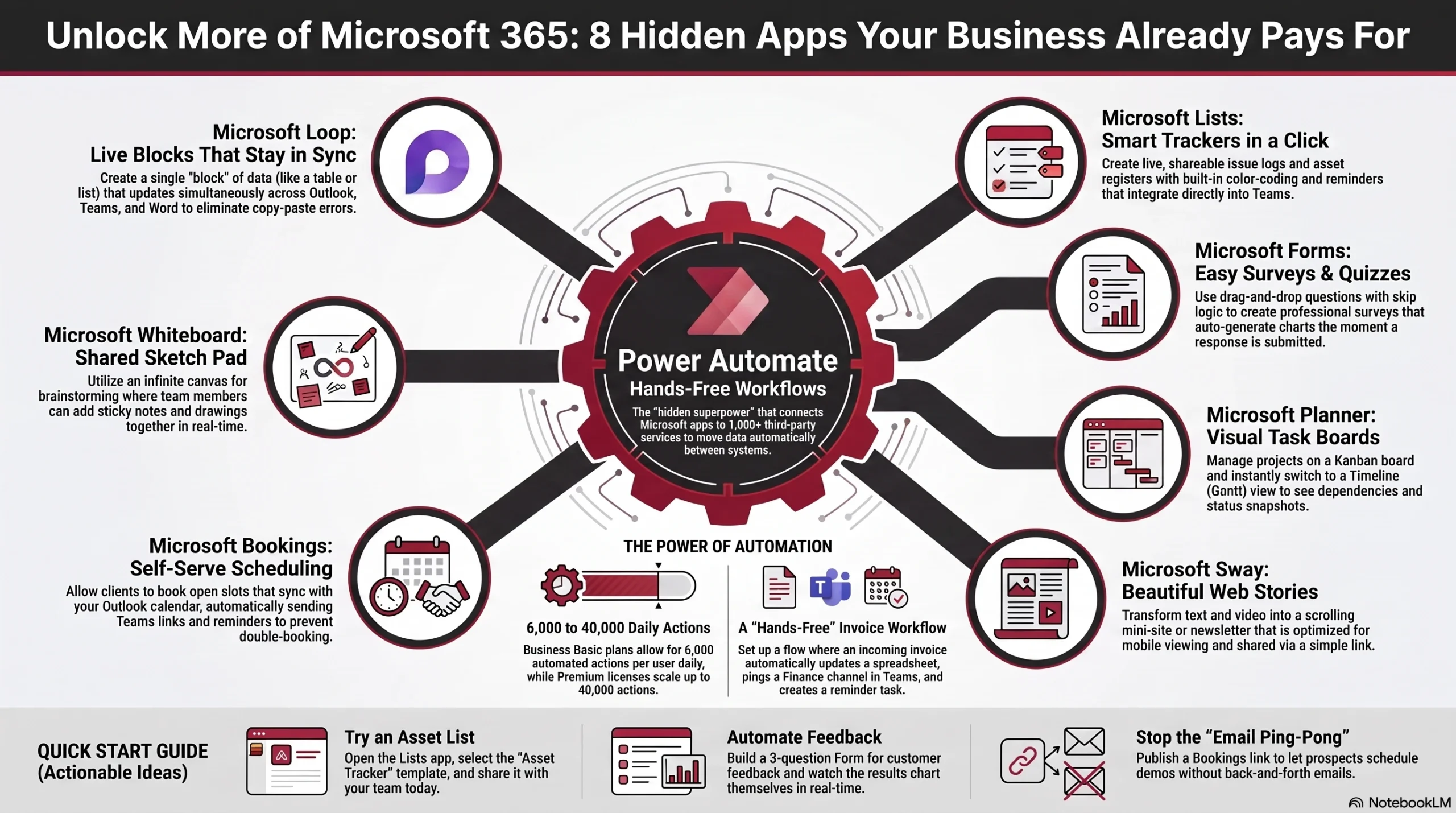
Actionable Ideas
- Make an asset list: Open Lists → “Asset tracker” template → share with your team.
- Collect customer feedback: Build a 3‑question Form and watch results chart themselves.
- Visualise your to‑dos: Add a Planner board to your main Teams channel.
- Create a quick update page: Paste last quarter’s highlights into Sway and send the link.
- Publish a booking link: Turn on Bookings and let prospects book a demo without email ping‑pong.
So before you buy another subscription, dive into your Microsoft 365 menu!
Sources
- https://support.microsoft.com/en-us/office/list-templates-in-microsoft-365-62f0e4cf-d55d-4f89-906f-4a34e036ded1 “List templates in Microsoft 365”
- https://learn.microsoft.com/en-us/microsoftteams/manage-lists-app “Manage the Lists app for your organization – Microsoft Teams”
- https://support.microsoft.com/en-us/office/use-branching-logic-in-microsoft-forms-16634fda-eddb-44da-856d-6a8213f0d8bb “Use branching logic in Microsoft Forms”
- https://nboldapp.com/beginners-guide-to-planner-premium-timelines-dependencies-and-more/ “Beginner’s Guide to Planner Premium: Timelines, Dependencies …”
- https://techcommunity.microsoft.com/blog/plannerblog/the-new-microsoft-planner-begins-roll-out-to-general-availability/4101056 “The new Microsoft Planner begins roll out to General Availability”
- https://sway.cloud.microsoft/ “Microsoft Sway | Create visually striking newsletters, presentations …”
- https://learn.microsoft.com/en-us/answers/questions/5046150/sync-outlook-calendar-with-bookings-calendar-to-pr “Sync Outlook Calendar with Bookings Calendar to prevent …”
- https://support.microsoft.com/en-us/topic/unleash-ideas-on-microsoft-whiteboard-s-infinite-canvas-d344e700-b90f-4bdf-8fb8-81d4c60298ca “Unleash ideas on Microsoft Whiteboard’s infinite canvas”
- https://support.microsoft.com/en-us/office/supercharge-your-hybrid-workplace-with-microsoft-whiteboard-b051886a-b12f-4ebe-ae18-a8100fa72b1f “Supercharge your hybrid workplace with Microsoft Whiteboard”
- https://support.microsoft.com/en-us/office/get-to-know-loop-components-fc574b2a-ead0-4d7e-bb56-94dd6469ebcf “Get to know Loop components – Microsoft Support”
- https://visualpathblogs.com/powerapps-powerautomate/power-automate-limits-that-most-users-overlook/ “Power Automate Limits That Most Users Overlook – Visualpath Blogs”
- https://www.microsoft.com/en-za/microsoft-365/business/compare-all-microsoft-365-business-products “Compare Microsoft 365 Business Plans and Pricing”