

 Automation
 AI Integration
 Web Development & Hosting
 Resource Hub
Spreadsheets are useful. They are flexible, familiar, and low-cost. They work well for calculations, quick analysis, and early-stage tracking. That is why so many businesses start there.
The problem starts when the spreadsheet stops being a tool and becomes the system your operation depends on.
That shift is common in South African businesses, where many businesses still rely heavily on spreadsheets, paper forms, and manual workflows to run important parts of the business.
Once that happens, the issue is no longer about formulas or file layout. It becomes a visibility, control, and workflow problem.
Here are seven signs your business has reached that point.
Prefer to watch or listen?
Get a comprehensive overview of the article’s key insights by playing our summary video.
Disclaimer: This video is an automated summary generated using NotebookLM by Google based on the original article text. While it provides an accurate overview of the key themes, please refer to the full original article for complete details and context.

1. You have multiple versions of the same file
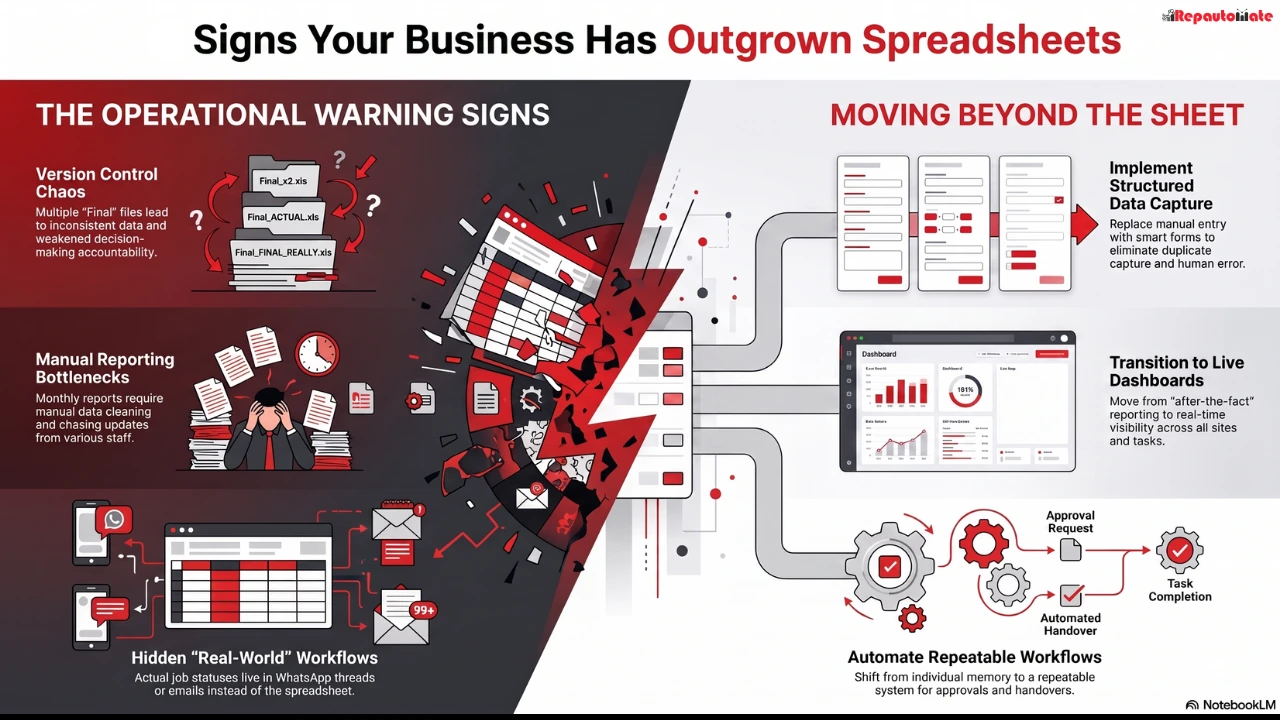
When a team is working from “Final.xlsx”, “Final V2.xlsx”, and “Use This One.xlsx”, the spreadsheet is no longer giving you control.
This usually means people are sending files back and forth, saving local copies, or updating their own version because they do not trust what is in the shared one. Even in cloud-based sheets, teams often create side files or work outside the main document when the process becomes too messy.
The real problem is not duplication. It is decision-making based on inconsistent information. Once different people are working from different versions of the truth, reporting slows down, accountability weakens, and mistakes become harder to trace.

2. Reporting depends on someone chasing updates
If a weekly or monthly report only happens because one person phones people, checks emails, copies figures, and cleans data by hand, the business has outgrown spreadsheets.
That approach may work when the team is small and the process is simple. It becomes fragile as soon as you add more sites, more staff, more clients, or more moving parts.
A spreadsheet can store information. It does not automatically make reporting reliable when data is arriving late, in different formats, from different places. If reporting takes too long, the issue is not just admin load. It is delayed visibility. By the time the report is ready, the business may already be reacting too late.

3. The real work is happening in WhatsApp, email, and phone calls
This is one of the clearest signs.
The spreadsheet says one thing, but the actual job status lives somewhere else. A manager sends an update by voice note. A team member confirms completion on WhatsApp. A client asks for progress by email. Someone else makes a note on paper and plans to capture it later.
At that point, the spreadsheet is only a partial record. It is not the workflow.
This creates gaps between what was done, what was communicated, and what was recorded. In operations-heavy businesses, those gaps lead to missed handovers, unclear responsibility, and poor follow-through. For example, a site inspection may be completed, but if the corrective action is still sitting in a chat thread, the business has a tracking problem, not just a spreadsheet problem.

4. You cannot see what is happening right now
Spreadsheets are often good at telling you what happened after someone updates them. They are much weaker when you need live operational visibility across people, sites, jobs, or tasks.
If you cannot quickly answer questions like these, your spreadsheet setup is under strain:
- What is still outstanding today?
- Which jobs are delayed?
- Which incidents are unresolved?
- Which approvals are waiting?
- Which site has repeated issues?
- Which client update is overdue?
When leaders have to ask around before they can act, visibility is too dependent on people rather than process. That slows decisions down and makes performance harder to manage.

5. Errors keep appearing because data is captured more than once
The more manual steps a business adds around a spreadsheet, the more chances there are for human error.
A name is typed differently. A date format changes. A row gets deleted. A number is copied into the wrong column. A job status is updated in one sheet but not another. None of these errors are unusual. They are normal outcomes when the same information is captured, copied, and checked in multiple places.
This matters because small data errors often create much bigger operational problems. An incorrect stock figure can affect ordering. A missed incident log can affect client communication. An outdated job status can lead to unnecessary follow-ups or missed deadlines.
When the same business data is being entered more than once, the process usually needs redesign, not just stricter admin discipline.

6. One person has become the spreadsheet expert and the bottleneck
Many businesses have one person who “knows how it all works.”
They built the tabs. They understand the formulas. They know which columns matter. They fix broken references. They clean the data before meetings. They explain the report to everyone else.
That may feel efficient, but it creates risk.
If that person is on leave, overloaded, or leaves the business, reporting and workflow control can stall immediately. The business becomes dependent on individual memory instead of a clear operating system.
This is not a people problem. It is a design problem. A healthy process should be understandable, repeatable, and usable by the team that depends on it.

7. Growth is creating more admin instead of more control
As a business grows, complexity grows with it.
More staff means more handovers. More clients mean more updates. More sites mean more reporting. More services mean more exceptions, approvals, and edge cases.
A spreadsheet can stretch for a while. Then it starts absorbing complexity instead of managing it.
You add more tabs, more formulas, more colour coding, more manual checks, more reminders, and more workarounds. The team spends more time maintaining the system than using it to move work forward.
That is the clearest sign of all. The spreadsheet is no longer simplifying the business. It is becoming part of the operational load.
What this usually means
Outgrowing spreadsheets does not mean spreadsheets are bad. It means your business now needs stronger workflow control than a spreadsheet alone can provide.
That usually includes better data capture, clearer task ownership, live status tracking, more reliable reporting, and a cleaner way to manage approvals, updates, and follow-through.
In practical terms, the next step is often not a big software overhaul. It is a better system around the work you already do.
That could mean replacing manual capture with structured forms. It could mean turning a reporting process into a tracked workflow. It could mean creating a live dashboard instead of waiting for end-of-week updates. It could mean giving teams one place to log, track, and act on operational information instead of spreading it across files and chat threads.
The point is not to add more technology for its own sake, it’s to make the business easier to run.
If your team is seeing several of these signs at once, the issue is no longer spreadsheet formatting. It is operational design. Fix that well, and reporting improves, follow-through improves, and people spend less time chasing information and more time acting on it.
Not sure where to start? Automation happens to be our specialty.