

 Automation
 AI Integration
 Custom Business Systems
 Web Development & Hosting
 Resource Hub
AI is often spoken about as if it belongs only in large corporations with large budgets, data teams, and complex technology departments. That is not the reality anymore.
For many South African businesses, the most practical use of AI is much simpler: reduce the repetitive admin that slows teams down, delays reporting, creates follow-up work, and pulls people away from higher-value responsibilities.
This does not need to mean replacing employees.
In many cases, the better goal is to remove repetitive work around people so staff can spend more time on judgement, client relationships, problem-solving, operations, and follow-through.
A business does not become more efficient because it “adds AI”. It becomes more efficient when AI is applied to specific workflows: how information is captured, checked, routed, reported, summarised, communicated, and acted on.
This article explains how South African businesses can realistically reduce admin costs with AI, how the “over R100K” saving can be justified, and how to implement AI in a way that supports staff instead of threatening them.
Prefer to watch or listen?
Get a comprehensive overview of the article’s key insights by playing our summary video.
Disclaimer: This video is an automated summary generated using NotebookLM by Google based on the original article text. While it provides an accurate overview of the key themes, please refer to the full original article for complete details and context.
What “Eliminating Admin Costs” Really Means
When we talk about eliminating over R100K in admin costs, we are not talking about removing R100K from payroll by cutting staff.
We are talking about reducing the cost of avoidable manual work.
That cost often appears in places like:
- Re-entering the same information into multiple systems
- Manually compiling weekly or monthly reports
- Searching through emails, WhatsApp messages, documents, and spreadsheets
- Drafting repetitive client updates
- Following up on missing information
- Copying data from PDFs, forms, invoices, job cards, or inspection sheets
- Creating meeting notes, summaries, and task lists
- Chasing approvals and status updates
- Answering the same operational questions repeatedly
These tasks may be necessary, but they are not always the best use of skilled human time. The real business case for AI integration in South Africa is not “AI instead of people”. It is “AI around people”, where systems handle repetitive steps and staff handle decisions, relationships, exceptions, and accountability.
Why This Matters for South African Businesses
South African Businesses are already becoming more digital. Mastercard’s 2025 SME Confidence Index reported that 90% of SMEs in South Africa had adopted digital payments, and that 92% identified team management and upskilling as a key support area for long-term success. That matters because digital adoption without staff enablement often creates more tools, but not better operations. (Mastercard)
This is where AI implementation for businesses often succeeds or fails. The value is not only in the AI productivity tool. It is in how well the tool fits the workflow, how clearly staff are trained, and whether the business has simple rules for safe and responsible use.
AI systems South Africa businesses adopt should improve workflow control, reporting, communication, and visibility. They should not become another disconnected tool that staff use inconsistently.
The R100K Admin Cost Calculation: How the Claim Can Be Justified
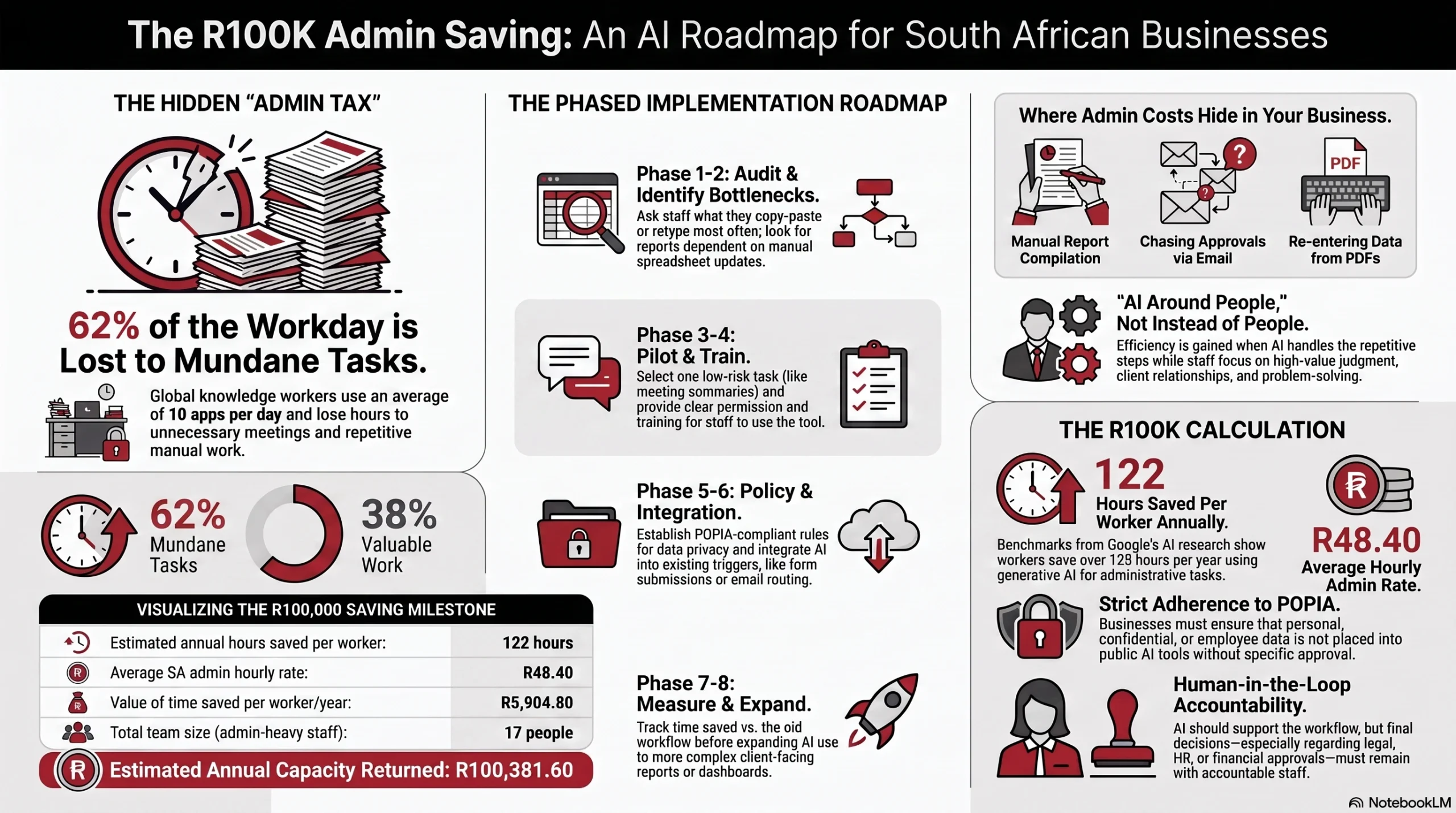
The “over R100K” claim is realistic for admin-heavy teams when it is calculated from time saved, multiplied by the hourly cost of the relevant admin work.
Google’s AI Works findings are useful as a benchmark. In its 2025 AI Works report, Google said workers across the pilot sectors estimated that generative AI was saving them roughly over 122 hours per year. The same report also found that a few hours of training could double daily AI usage, and that workers often needed reassurance that using AI at work was allowed. (blog.google)
For a South African wage reference, PayScale lists the average base hourly rate for office administration skills in South Africa at R48.40 per hour, based on 1,013 individuals reporting and updated in April 2026. This is a third-party salary benchmark, not a statutory wage rate, so businesses should replace it with their own payroll cost where possible. (Payscale)
Using those two public data points, the calculation looks like this:| Calculation step | Figure |
|---|---|
| Estimated annual hours saved per worker using AI for admin tasks | 122 hours |
| Average South African office administration hourly rate used | R48.40 |
| Value of admin time saved per worker per year | R5,904.80 |
| Number of admin-heavy staff or staff doing recurring admin work | 17 |
| Estimated annual admin capacity returned | R100,381.60 |
Formula:
122 hours saved per person × R48.40 per hour × 17 people = R100,381.60
This is not a guaranteed saving. It is a defensible capacity calculation.
It means that a 17-person team, where each person saves 122 hours per year on admin-heavy work, could remove more than R100K worth of manual admin effort from the business.
The important point is that your business should calculate its own number.
Use this formula:
Annual admin cost reduced = hours saved per person per year × hourly cost × number of people affected
Use our free calculator to calculate how much manual tasks are draining your budget.
For a more accurate internal calculation, include:
- Basic salary cost
- Employer contributions where relevant
- Management time spent checking work
- Cost of rework caused by errors
- Delays caused by missing information
- Time spent compiling information from multiple sources
The goal is not to create a perfect financial model, it’s to identify where manual admin is large enough, repetitive enough, and measurable enough to justify AI workflow automation.
Why AI Works Best When It Supports Staff
A common mistake is to treat AI as a replacement strategy before treating it as a workflow improvement strategy.
That creates fear, resistance, and poor adoption.
A better approach is to show staff how AI can help them do their work with less repetition and more consistency.
Research supports this view. A National Bureau of Economic Research digest on the study “Generative AI at Work” found that customer support agents using an AI tool to guide conversations saw a 13.8% increase in issues resolved per hour. The study also found that the largest gains were among less experienced and lower-skilled workers, while the AI tool supported agents with suggested responses that they could accept or ignore. (NBER)
That is a useful lesson for South African businesses, AI adoption is more effective when it helps staff:
- Draft faster
- Find information faster
- Follow a consistent process
- Reduce rework
- Learn from better examples
- Handle routine queries more confidently
- Spend more time on exceptions and decisions
AI should not remove accountability. It should reduce the low-value admin around accountable work.
Where Admin Costs Usually Hide
Most businesses underestimate admin because it is spread across the day.
It is not always visible as one large block of wasted time. It appears in small repeated interruptions.
Asana’s 2023 Anatomy of Work Global Index surveyed 9,615 global knowledge workers and reported that leadership lost 3.6 hours per week to unnecessary meetings, used 10 apps per day, and lost 62% of the workday to repetitive, mundane tasks. (Asana)
In an operations-driven business, admin costs often show up when:
- Reports are compiled manually from several spreadsheets
- Managers ask multiple people for the same update because no live status view exists
- Client updates depend on manual checking and follow-up
- Job cards, inspection sheets, or incident reports are captured twice
- Documents are checked manually before work can move forward
- Staff answer the same internal or customer questions repeatedly
AI for business administration is most valuable when it targets repeated patterns like these.
The Main AI Types Businesses Can Use
| AI Types | What it is | Realistic business use cases | Potential admin and time savings | Implementation considerations |
|---|---|---|---|---|
| Generative AI | AI that creates or improves content such as text, summaries, reports, emails, images, audio, video, or code based on a prompt. IBM defines generative AI as AI that can create original content in response to a request. (IBM) | Drafting client updates, summarising meetings, rewriting technical notes into plain language, preparing first drafts of SOPs or policies, creating internal training material. | Reduces time spent writing, rewriting, summarising, and formatting. | Staff must review outputs. Do not paste sensitive company, client, or employee information into public tools unless approved. Create prompt examples for common tasks. |
| Conversational AI | AI that users can talk to through text or speech. IBM describes conversational AI as technologies such as chatbots or virtual agents that users can interact with. (IBM) | Customer FAQs, internal helpdesk support, policy lookup, support request guidance, lead capture, service status queries. | Reduces repetitive questions and improves first-response consistency. | Start with a narrow set of approved questions. Escalate sensitive or complex conversations to a person. Keep the knowledge base updated. |
| AI Assistants | AI tools configured to help employees complete specific tasks faster. | Preparing weekly manager summaries, drafting follow-up emails, finding internal information, creating task lists from notes, helping staff complete forms correctly. | Reduces time spent switching between documents, emails, spreadsheets, and task lists. | Define which roles need assistants first. Limit access to approved information. Train staff on useful prompts and checking outputs. |
| AI Agents for Business | AI systems that can perform a defined sequence of actions using tools and workflows. IBM describes AI agents as systems that autonomously perform tasks by designing workflows with available tools. (IBM) | Classifying incoming requests, checking form completeness, creating draft job cards, routing support tickets, preparing overdue task summaries. | Removes repeated coordination steps and reduces manual routing. | Start with read-only or draft-only actions. Require human approval for high-impact actions. Keep logs of what the agent did. |
| Workflow Automation AI | Automation that uses AI to classify, summarise, extract, or interpret information before the next step happens. | Email-to-task workflows, approval reminders, request classification, exception flagging, workflow summaries. | Reduces manual handovers, duplicate capture, follow-ups, and status chasing. | Map the workflow before automating. Remove unnecessary steps first. Decide which steps require human approval. |
| AI-Integrated Reporting | Reporting that uses AI to summarise operational data and highlight what needs attention. | Weekly operations summaries, site performance reports, exception reports, compliance updates, management packs. | Reduces time spent compiling reports and writing commentary. | Data sources must be reliable. AI-generated commentary should be checked against source data. |
| AI Document Processing | AI that reads, classifies, and extracts information from documents. IBM explains that intelligent document processing can use AI to read and classify document types and extract the appropriate data. (IBM) | Invoices, forms, proof documents, application packs, delivery notes, inspection sheets, PDFs. | Reduces manual data capture, document checking, filing, and rework. | Test accuracy on real documents. Use human review for low-confidence results. Keep original documents linked to extracted records. |
| AI Knowledge Systems | AI connected to approved internal knowledge so staff can ask questions and find answers faster. | SOP search, HR policy questions, product knowledge, field team guidance, compliance procedures, troubleshooting support. | Reduces repeated questions, interruptions, onboarding time, and inconsistent answers. | Clean the knowledge base first. Remove outdated documents. Use permissions for sensitive information. |
| AI-Enhanced Customer Communication | AI support for drafting, summarising, translating, or simplifying customer communication. | Draft support replies, summarise customer issues, prepare service updates, create client report commentary. | Reduces repetitive drafting and context searching. | Human review is important for tone, accuracy, and sensitive matters. Escalation rules must be clear. |
| AI-Enhanced Data Capture | AI support at the point where information enters the business. | Smart forms, field reports, incident forms, inspection forms, voice notes converted into structured reports. | Reduces missing information, back-and-forth follow-ups, and manual correction. | Keep forms practical. Capture information once, at source. Test with the people who will actually use the process. |
| AI-Enhanced Dashboards and Reporting | Dashboards that show what is happening, with AI summaries to explain what needs attention. | Operations dashboards, SLA tracking, incident reporting, workflow bottlenecks, corrective action tracking. | Reduces manual status checks, spreadsheet updates, and repeated “what is happening?” meetings. | Each dashboard should support a decision. AI summaries must be checked against source data. Managers need training on how to use the dashboard. |
AI-Enhanced Dashboards and Reporting Dashboards that show what is happening, with AI summaries to explain what needs attention. Operations dashboards, SLA tracking, incident reporting, workflow bottlenecks, corrective action tracking. Reduces manual status checks, spreadsheet updates, and repeated “what is happening?” meetings. Each dashboard should support a decision. AI summaries must be checked against source data. Managers need training on how to use the dashboard.
The strongest results usually come from combining these avenues into one practical operational system.
For example, a business may use smart forms to improve data capture, AI document processing to reduce manual entry, workflow automation to route tasks, AI reporting to summarise activity, and dashboards to improve visibility.
That is more useful than adding one isolated AI tool and expecting staff to figure out where it fits.
Where to Start: The Best AI Use Cases for Admin Cost Reduction
A business should not start by asking, “Which AI tool should we buy?”. A better starting question is: Which repetitive admin tasks are costing us the most time, creating the most delays, or causing the most rework?
The best early AI use cases usually have five traits:
- The task happens often
- The process is already understood
- The risk is low or manageable
- The output can be checked by a person
- The time saving can be measured
Good starting points include:
- Meeting summaries and action lists
- Report drafts
- Internal knowledge search
- Customer response drafts
- Form checking
- Document extraction
- Email classification
- Workflow reminders
- Dashboard commentary
- Data cleanup and formatting
Avoid starting with high-risk decisions such as disciplinary action, credit approval, legal conclusions, medical advice, or fully automated customer dispute resolution. AI should first support the workflow. It should not take over sensitive decisions before the business has proper controls.
A Practical Phased Action Plan for AI Implementation
AI integration South Africa businesses can trust usually follows a phased approach.
Trying to implement everything at once creates confusion. A phased plan reduces risk, builds confidence, and gives staff time to adapt.
Phase 1: Identify Repetitive Tasks
Start by listing the admin tasks that repeat daily, weekly, or monthly.
Ask each team:
- What do you copy and paste often?
- What do you retype?
- What reports take the longest?
- What information do you often chase?
- What questions do you answer repeatedly?
- Where do mistakes create rework?
- Which tasks feel necessary but low-value?
Do not rely only on management’s view. Ask the people doing the work.
Phase 2: Audit Admin Bottlenecks
Once the tasks are listed, identify the bottlenecks.
Look for:
- Tasks waiting for missing information
- Reports dependent on manual spreadsheet updates
- Approvals stuck in email
- Field information captured too late
- Client updates prepared manually from several sources
- Data stored in disconnected systems
- Repeated questions caused by unclear information
A business automation South Africa project should not simply automate a bad process. First, simplify the workflow.
Phase 3: Choose One Low-Risk Pilot
Select one workflow where AI can help quickly and safely.
Good pilot options include:
- AI-generated meeting summaries
- AI-assisted weekly operations reports
- AI document extraction for one form type
- Internal AI assistant for SOP questions
- AI draft responses for common customer queries
- AI-assisted job card summaries
Define the pilot clearly:
- What task will AI support?
- Who will use it?
- What information can it access?
- What must a human approve?
- How will time saved be measured?
- What risks must be controlled?
Keep the pilot narrow. A clear small win is better than a confusing broad rollout.
Phase 4: Train Staff Properly
Training is not optional.
Google’s AI Works findings are useful here because they show that adoption improves when workers receive training and clear permission to use AI. (blog.google)
Training should cover:
- What AI is good at
- What AI is not good at
- How to write useful prompts
- How to check AI outputs
- What information may not be entered into AI tools
- When to escalate to a person
- How AI fits into the actual workflow
Staff should leave training with practical examples for their role, not abstract AI theory.
Phase 5: Create an AI Usage Policy
Every business using AI should have simple rules.
This does not need to be a long legal document at the start. It should be clear enough for staff to follow.
Include rules for:
- Approved AI tools
- Data privacy
- Client information
- Confidential business information
- Human review
- Accuracy checks
- Record keeping
- Client communication
- Sensitive decisions
- Accountability
For South African businesses, this should connect to POPIA obligations. The Information Regulator states that POPIA promotes the protection of personal information processed by public and private bodies by introducing conditions for lawful processing and minimum requirements for processing personal information. (Inforegulator)
A practical staff rule is: Do not place personal, confidential, client, employee, or commercially sensitive information into an AI tool unless the business has approved that use.
Phase 6: Integrate AI Into Existing Workflows
This is where AI becomes operationally useful.
Instead of asking staff to use separate AI tools manually, integrate AI into the places where work already happens.
For example:
- A form submission triggers an AI summary
- An email request creates a classified task
- A support ticket receives a suggested response
- A document upload triggers extraction and validation
- A dashboard receives a weekly AI-assisted summary
This is the difference between casual AI use and AI workflow automation.
The tool should reduce admin inside the workflow, not add another step outside it.
Phase 7: Measure Time Savings
Measure before and after.
Track:
- Time taken to complete the task before AI
- Time taken after AI
- Error rate
- Rework
- Response time
- Number of follow-ups
- Staff satisfaction
- Customer impact
- Manager review time
Example measurement table:
| Workflow | Before AI | After AI | Saving |
|---|---|---|---|
| Weekly report preparation | 4 hours | 1.5 hours | 2.5 hours |
| Meeting notes and action list | 45 minutes | 10 minutes | 35 minutes |
| Document capture per file | 8 minutes | 3 minutes | 5 minutes |
| Monthly dashboard commentary | 3 hours | 45 minutes | 2.25 hours |
Phase 8: Expand Gradually
After one successful pilot, expand to related workflows.
A practical sequence could be:
- Start with AI meeting summaries
- Add action tracking
- Add automated reminders
- Add dashboard visibility
- Add management summaries
- Add client-facing reporting
This staged approach builds trust.
It also helps staff see AI as a support system, not a threat.
What Not to Automate Too Early
Not every task should be automated immediately.
Be careful with:
- Legal interpretations
- HR disciplinary decisions
- Final financial approvals
- Medical or safety-critical advice
- Sensitive customer complaints
- Employee performance judgements
- High-value contractual decisions
- Automated rejection decisions
- Anything involving vulnerable people or protected personal information
AI can assist with preparation, summarisation, and checking. But final decisions in sensitive areas should stay with accountable people.
The NIST AI Risk Management Framework highlights trustworthy AI characteristics such as validity, reliability, safety, security, resilience, accountability, transparency, explainability, privacy, and fairness. These are useful principles for any business implementing AI, even outside the United States. (NIST Publications)
For a South African Business, this means AI should be practical, controlled, reviewable, and appropriate for the risk level of the task.
How to Get Staff Buy-In
Staff resistance is often not about technology. It is about uncertainty.
People may worry that AI will make their roles less secure, make their work feel monitored, or create expectations that they must do more with less support.
A better implementation message is:
We are using AI to reduce repetitive admin, improve consistency, and give the team more time for higher-value work.
That message must be backed by actions.
To build trust:
- Involve staff in selecting admin pain points
- Ask them which tasks they want reduced
- Show examples before rolling out tools
- Give practical training
- Keep humans responsible for final outputs
- Do not use AI adoption as a hidden performance trap
- Use staff feedback to improve the system
AI works best when staff feel included in the change.
How to Know Whether AI Is Worth Exploring
AI is worth exploring if your business has any of these signs:
- Staff spend hours compiling reports manually
- Managers lack visibility across teams or sites
- Client updates depend on manual follow-up
- Important information sits in emails, spreadsheets, or WhatsApp
- Admin staff retype the same data into different places
- Approvals get delayed because nobody has a clear workflow
- Staff answer the same internal questions repeatedly
- Documents are checked manually every day
- Reporting is inconsistent between teams
- You cannot easily see what work is overdue, stuck, or at risk
These are not “AI problems”. They are operational problems.
AI becomes useful when it is applied to the right part of the operational system.
A Responsible AI Checklist for South African Businesses
Before rolling out AI, use this checklist:
- Have we identified the specific admin task?
- Have we measured current time spent?
- Do we know who owns the workflow?
- Have we checked what data AI will access?
- Have we considered POPIA and confidentiality?
- Have we trained staff?
- Have we defined what needs human review?
- Have we tested AI outputs on real examples?
- Have we created an escalation process?
- Have we measured time saved after implementation?
- Have we documented the approved use case?
- Have we explained to staff that AI supports their work?
This checklist helps keep AI practical, responsible, and useful.
The Real Opportunity: Better Work, Not Just Faster Work
The strongest benefit of AI is not only speed.
It is better operational control.
When AI is implemented properly, businesses can improve:
- Response times
- Report consistency
- Data quality
- Workflow visibility
- Staff productivity
- Management follow-through
- Customer communication
- Compliance tracking
- Knowledge sharing
- Decision support
These improvements matter because admin does not only cost money. It also creates delays, frustration, missed details, and unclear accountability.
Reducing admin gives staff more time for the work that actually moves the business forward.
Conclusion: Use AI to Remove Repetition, Not People
South African businesses do not need to wait until they are large enterprises to benefit from AI. The practical starting point is simple: find the repetitive admin that consumes staff time, measure it, and use AI to reduce it in a controlled way.
The R100K saving is not magic. It comes from a clear calculation:
Annual admin cost reduced = hours saved per person per year × hourly cost × number of people affected
Use our free calculator to calculate how much manual tasks are draining your budget.
For admin-heavy teams, the numbers can become meaningful quickly. But the real value is not only financial. It is also operational.
AI can help staff spend less time on repetitive admin and more time on useful work: serving clients, solving problems, improving processes, managing exceptions, and making better decisions. That is how businesses become smarter without treating people as disposable.
Repautomate helps South African businesses implement practical AI systems around real workflows. This includes AI integration services, custom AI systems, AI integration into existing systems, AI policy assistance, AI training for businesses, workflow automation, and AI implementation guidance.
The goal is not to add technology for its own sake. The goal is to reduce repetitive work, improve visibility, support your team, and build a business that runs with more clarity and control.