

 Automation
 AI Integration
 Custom Business Systems
 Web Development & Hosting
 Resource Hub
Paper-based site management can look cheap from the outside.
The visible costs are easy to understand: paper, printing, files, folders, scanning, storage, and admin time. Those costs matter, but they are not usually the biggest problem.
The real cost is hidden in the workflow.
It shows up when daily site reports arrive late, inspection forms go missing, photos sit in WhatsApp chats, handwritten notes are hard to read, approvals are delayed, and managers spend time chasing information that should already be available.
For construction firms, the issue is not only paperwork. The deeper issue is poor information flow.
When site information is captured on paper, shared through WhatsApp, stored in email threads, retyped into spreadsheets, and manually rebuilt into reports, the business loses speed, accuracy, visibility, and control.
Smart forms help fix that problem at the point where site information first enters the business. Daily reports, safety inspections, incident reports, quality checks, snag lists, delivery records, subcontractor sign-offs, variation requests, and handover documents all become more useful when they are structured, searchable, mobile-friendly, and connected to the next step in the workflow.
That is why digital forms for construction should not be treated as a small admin upgrade. Used properly, they can reduce repetitive admin, improve site reporting, strengthen audit trails, and help construction firms save thousands by recovering time that is currently lost to manual paperwork and information chasing.
Prefer to watch or listen?
Get a comprehensive overview of the article’s key insights by playing our summary video.
Disclaimer: This video is an automated summary generated using NotebookLM by Google based on the original article text. While it provides an accurate overview of the key themes, please refer to the full original article for complete details and context.
Why Paper-Based Site Management Still Exists
Most construction teams do not use paper because they are careless.
They use it because it is familiar, flexible, and easy to understand on a busy site. Paper does not need a login. It can be handed to almost anyone. It feels quick in the moment.
There are also practical reasons paper, spreadsheets, WhatsApp messages, and email attachments remain common on construction sites:
- Site teams may have inconsistent internet access.
- Supervisors may be used to existing routines.
- Office teams may still depend on spreadsheets for reporting.
- Managers may not want to disrupt active projects.
- Previous software attempts may have been too complicated.
- The business may not have standardised its site forms.
- Photos, signatures, reports, and approvals may already be scattered across different places.
That context matters. The goal is not to criticise site teams for using paper. The goal is to make site reporting easier, faster, and more reliable without creating unnecessary friction for the people doing the work.
McKinsey notes that few construction companies have fully digitised their operations outside individual major projects, and that digital transformation in engineering and construction can result in productivity gains of 14 to 15 percent and cost reductions of 4 to 6 percent when linked to operational change. (McKinsey & Company)
The important phrase is operational change. Smart forms work best when they improve the way information is captured, checked, routed, reported, and acted on. They are less useful when a business simply turns a poor paper form into a digital version of the same poor process.
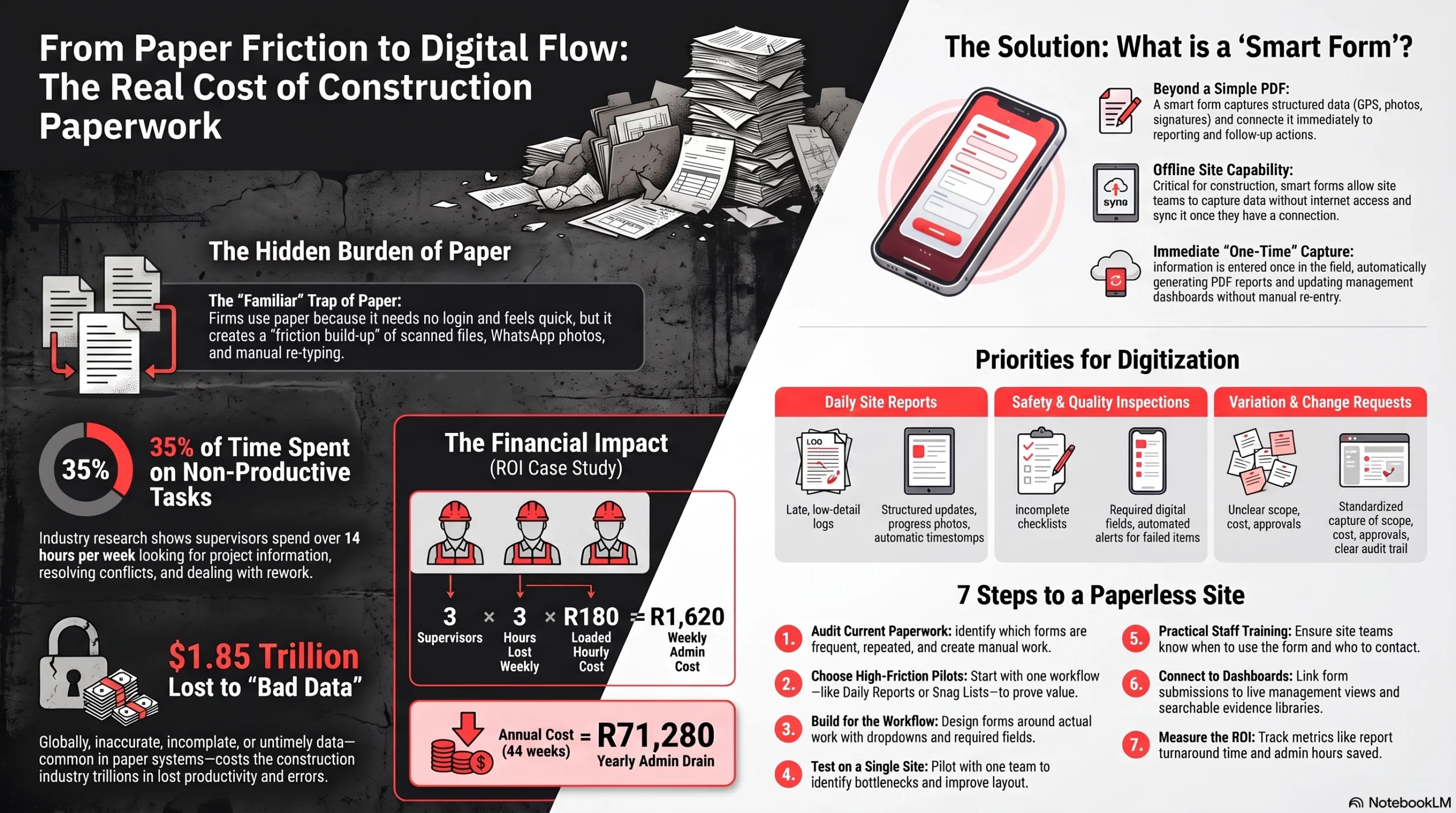
The Real Cost of Paper-Based Construction Paperwork
The cost of paper-based site management is rarely one dramatic failure.
It is usually a build-up of repeated friction.
A supervisor fills in a daily report by hand. Someone takes site photos on a phone. The photos are sent through WhatsApp. The paper form is scanned later. An admin person retypes part of it into a spreadsheet. A project manager asks for an update. Someone searches through messages. A missing signature delays approval. The report goes out late.
Each step may feel manageable. Across many forms, projects, sites, teams, and weeks, it becomes expensive.
Admin time
Paper forms often create work after the site work is already done.
Someone still needs to collect the paperwork, check it, scan it, file it, rename it, send it, retype it, and chase missing information. That time consumes supervisor capacity, admin capacity, project manager attention, and sometimes commercial team time.
PlanGrid and FMI’s Construction Disconnected research found that respondents spent 35 percent of their time, or over 14 hours per week, on non-productive activities such as looking for project information, resolving conflict, and dealing with mistakes and rework. Autodesk’s summary of the report estimated that these non-optimal activities represented more than $177 billion in U.S. construction labour costs in 2018. (Autodesk)
Delayed reporting
Paper-based construction daily reports often arrive late because they depend on manual collection and compilation.
A late report is not only an admin issue. It affects decision-making. If managers only see yesterday’s safety issue, quality concern, delay, variation note, or incomplete task after the opportunity to act has passed, the business loses control.
Lost or incomplete forms
A paper form can be misplaced, damaged, left in a vehicle, filed under the wrong project, or submitted without key details.
Incomplete forms create follow-up work. They also weaken the record. A missing time, date, location, signature, photo, or approval can matter later when the business needs to prove what happened.
Duplicated data entry
When site information is captured on paper and then re-entered into spreadsheets or reports, the business pays twice for the same information.
It also increases the chance of error. Names can be misspelled. Quantities can be typed incorrectly. Dates can be changed by mistake. Photos can be linked to the wrong issue.
Document control problems
Construction teams manage changing information: drawings, revisions, instructions, checklists, snag items, safety records, approvals, and handover documents.
When forms, photos, and attachments live across paper files, email threads, WhatsApp chats, and spreadsheets, it becomes harder to know which record is complete, current, and approved.
NIST research into inadequate interoperability in the U.S. capital facilities industry found that interoperability problems stemmed from fragmentation, continued paper-based business practices, lack of standardisation, and inconsistent technology adoption. The study quantified $15.8 billion in annual interoperability costs for the U.S. capital facilities industry in 2002. (NIST)
Rework and dispute risk
Paper does not automatically cause rework. But weak information flow can make rework more likely.
When the right information is late, incomplete, inaccessible, or unclear, teams are more exposed to mistakes, duplicated effort, missed instructions, poor handovers, and disputes.
The Construction Industry Institute states that rework can cost between 2 percent and 20 percent of a project’s contract amount on a typical project, and that reducing rework improves project performance and labour productivity. (Construction Industry Institute)
What the Research Says About Construction Inefficiency
Different studies measure construction inefficiency in different ways, but the pattern is consistent: poor data, poor communication, disconnected systems, and weak information access create avoidable cost.
| Source | Finding | Practical meaning |
|---|---|---|
| McKinsey | Digital transformation in engineering and construction can result in productivity gains of 14 to 15 percent and cost reductions of 4 to 6 percent. | Digital improvement can create measurable value when it is linked to operational change. (McKinsey & Company) |
| PlanGrid and FMI | Respondents spent 35 percent of their time, or over 14 hours per week, on non-productive activities such as looking for project information, conflict resolution, and rework. | A major portion of project time can disappear into information problems. (Autodesk) |
| PlanGrid and FMI | Poor project data and miscommunication were reported as responsible for 48 percent of all rework in U.S. construction in the study, accounting for $31.3 billion in rework in 2018. | Poor communication and inaccessible information can become a direct rework cost. (Autodesk) |
| Autodesk and FMI | “Bad data” was estimated to have cost the global construction industry $1.85 trillion in 2020. The study defined bad data as inaccurate, incomplete, inaccessible, inconsistent, or untimely. | Data quality affects decisions, cost, rework, and project outcomes. (Autodesk) |
| Construction Industry Institute | Rework can cost between 2 percent and 20 percent of a project’s contract amount. | Even a modest reduction in preventable rework can have commercial value. (Construction Institute) |
| NIST | Inadequate interoperability in the U.S. capital facilities segment carried an estimated $15.8 billion annual cost burden. | Disconnected systems and poor information exchange create measurable cost. (NIST) |
These figures should not be treated as a promise that any individual contractor will save a specific amount by digitising forms.
Savings vary by project size, labour cost, number of sites, form volume, project complexity, process maturity, and implementation quality.
The useful lesson is simpler:
Construction firms lose money when important site information is difficult to capture, find, trust, report, and act on.
How Paperwork Turns Into Real Financial Loss
Here is a simple South African example.
This is not a benchmark. It is only an illustration of how repeated paperwork friction can become a meaningful cost.
Assume:
- 3 supervisors each lose 3 hours per week completing, correcting, scanning, resubmitting, or searching for paperwork.
- The loaded hourly cost per supervisor is R180.
- The business operates this way for 44 project weeks in a year.
| Item | Calculation | Result |
|---|---|---|
| Supervisors affected | 3 supervisors | 3 |
| Hours lost per supervisor per week | 3 hours | 3 hours |
| Total weekly hours lost | 3 supervisors × 3 hours | 9 hours |
| Estimated loaded hourly cost | R180 per hour | R180 |
| Weekly admin cost | 9 hours × R180 | R1,62 |
| Project weeks per year | 44 weeks | 44 |
| Estimated annual paperwork cost | R1,620 × 44 weeks | R71,280 per year |
Formula:
Annual paperwork cost = people affected × hours lost per week × loaded hourly cost × project weeks per year
Example: 3 supervisors × 3 hours × R180 × 44 weeks = R71,280 per year.
If the same pattern affects 5 supervisors, the annual cost becomes R118,800.
That calculation excludes harder-to-measure costs such as delayed approvals, weak evidence during disputes, repeated defects, late reporting, missed escalation, and management time spent following up. Those costs differ from project to project, but the pattern is common: weak information capture creates weak workflow control.
Use our free calculator to estimate how much manual admin is draining from your budget.
What Smart Forms Actually Do
A smart form is not just a PDF version of a paper form.
A smart form is a digital form that captures structured information and connects that information to reporting, approvals, records, alerts, dashboards, and follow-up actions.
Depending on the workflow, a smart form can include:
- Mobile data capture
- Required fields
- Dropdown menus
- Conditional logic
- Timestamps
- GPS or location capture where appropriate
- Photo and video uploads
- Digital signatures
- Offline completion
- Automatic submission
- Automated PDF reports
- Dashboard reporting
- Approval workflows
- Issue escalation
- Integration with existing systems
- Structured data for analysis
The value is that information is captured once, in a cleaner format, closer to where the work happens.
That helps construction teams reduce manual re-entry, improve form completeness, standardise site inspections, link photos to the correct report or issue, create instant digital records, reduce reporting delays, improve management visibility, and make follow-up easier.
Construction Forms That Should Be Digitised First
The best forms to digitise first are usually the forms that are frequent, repeated, easy to standardise, and painful to manage manually.
| Form type | Paper-based problem | How a digital form improves it |
|---|---|---|
| Daily site reports | Reports arrive late, lack detail, or need manual compilation. | Site teams submit structured updates with labour, progress, delays, photos, and notes in one record. |
| Safety inspections | Checklists may be incomplete, inconsistent, or filed late. | Required fields, standard categories, photos, and corrective actions improve follow-through. |
| Incident reports | Photos, witness notes, and actions may be scattered. | Evidence, location, description, people involved, and actions are captured in one workflow. |
| Quality control checklists | Items may be skipped or recorded differently by each team. | Standardised checks improve consistency and make failed items easier to track. |
| Snag lists or punch lists | Items are tracked across paper, photos, messages, and spreadsheets. | Each item can have a status, owner, due date, image, location, and close-out record. |
| Material delivery records | Delivery notes can be misplaced or entered late. | Deliveries can be logged with quantity, supplier, time, photos, and receiver signature. |
| Subcontractor sign-offs | Sign-offs can be delayed, unclear, or difficult to retrieve. | Digital sign-off creates a time-stamped record with supporting evidence. |
| Variation or change requests | Requests may be sent by email or message without a consistent structure. | Scope, reason, cost, programme impact, attachments, and approval routing are captured clearly. |
The right starting point depends on where the business currently loses the most time or control.
A contractor struggling with delayed daily reports should start with the daily report process. A firm struggling with quality issues should start with inspections, snag lists, corrective actions, and close-out evidence. A business struggling with commercial control should look at variation requests, subcontractor sign-offs, delivery records, and proof of work.
How Smart Forms Save Construction Firms Thousands
Smart forms can help construction firms save thousands by reducing repeated losses across admin, reporting, approvals, evidence management, and issue escalation.
They do not guarantee savings by themselves. A badly designed digital form can simply move the same poor process onto a screen.
The savings come when forms are designed around the real workflow.
1. Fewer admin hours
When site information is captured digitally, the business can reduce scanning, retyping, renaming, filing, and manual report compilation.
This is usually one of the easiest savings areas to measure. Track how long it takes to complete, submit, process, and distribute a report before and after digitisation.
2. Faster reporting
A digital site report can be submitted from the field and sent automatically to the right people.
That improves construction project reporting and gives managers earlier visibility into delays, incidents, incomplete work, resource constraints, and site risks.
3. Fewer missing documents
Required fields, digital signatures, submission rules, and automatic storage reduce the chance of incomplete or missing forms.
This matters for safety files, quality records, payment support, client reporting, subcontractor records, and handover packs.
4. Less duplicated data entry
A good form captures information once and reuses it where needed.
For example, a daily report can feed an automated PDF, update a dashboard, store photos in the correct project folder, and flag delays without someone retyping the same information into multiple spreadsheets.
5. Better evidence for claims and disputes
Construction disputes often depend on evidence.
The business may need to show what happened, when it happened, who saw it, what was approved, what changed, and what was communicated.
Digital forms can improve the record by linking photos, signatures, timestamps, notes, locations, and approvals to the correct project item.
6. Faster issue escalation
A paper checklist may show a failed item, but only after someone reads it.
A digital inspection can notify the right manager when a critical item fails. It can also create an action, assign responsibility, and track close-out.
7. Improved accountability
Digital workflows make it clearer who submitted a form, who approved it, who was assigned an action, and whether that action was completed.
This does not replace management. It gives managers better visibility and fewer manual follow-ups.
8. Better project visibility
When forms feed dashboards, managers can see trends across sites.
They can monitor missing reports, open snags, overdue corrective actions, failed inspections, safety incidents, approval bottlenecks, and repeated issues.
Autodesk and FMI’s data research estimated that bad data may have cost the global construction industry $1.848 trillion in 2020. The study defined bad data as inaccurate, incomplete, inaccessible, inconsistent, or untimely. (Autodesk)
Why Smart Forms Work Best When Connected to Workflows
Digitising a form is useful, but connecting the form to the next step is where the real value starts.
A completed inspection should not sit in a folder waiting for someone to notice a failed item. A variation request should not disappear into an email thread. A daily report should not require an admin person to rebuild it manually every week.
A well-designed construction workflow can:
- Send reports automatically
- Notify managers of failed inspections
- Create action points from form responses
- Escalate urgent issues
- Update dashboards
- Store records in the correct project folder
- Generate branded PDF reports
- Route approvals to the right person
- Keep a clear audit trail
This is why the best approach is not simply “turn this paper form into a digital form.”
The better approach is:
Capture the information once, then move it to the right report, person, dashboard, folder, or approval step.
That is where smart forms become part of construction workflow automation.
Data Privacy and POPIA Considerations for Smart Forms
Construction forms can contain personal information.
Depending on the form, this may include names, contact details, signatures, employee information, photos, incident details, location data, subcontractor information, or customer information.
For South African businesses, smart forms should therefore be implemented with POPIA in mind. POPIA sets out conditions for the lawful processing of personal information, including accountability, processing limitation, purpose specification, information quality, openness, security safeguards, and data subject participation. (South African Government)
In practical terms, construction firms should consider:
- What personal information is being collected
- Why that information is needed
- Who can access it
- How long it should be kept
- How records are protected
- Whether location capture is necessary for the workflow
- Whether photos may include people, customers, or sensitive site information
- How staff and subcontractors are informed about the process
This does not mean digital forms should be avoided. It means they should be designed responsibly.
A controlled digital form system can often be easier to govern than paper files, WhatsApp photos, and scattered email attachments, because access, storage, timestamps, and records can be managed more consistently.
Common Mistakes When Moving Away From Paper
Moving away from paper does not need to be complicated, but it does need to be planned.
Digitising bad forms without improving them
A poor paper form does not become useful just because it is digital.
Before digitising, remove unnecessary fields, clarify wording, standardise categories, and decide what information managers actually need.
Creating too many fields
If a form is too long, site teams may avoid it, rush it, or enter low-quality information.
Only ask for information that supports reporting, compliance, decision-making, approval, or follow-up.
Ignoring offline site conditions
Some sites have weak or inconsistent connectivity.
The system should support offline completion where needed, with syncing when connectivity returns.
Not training staff
A digital process will fail if users do not understand when to use it, how to complete it, and what happens after submission.
Training should be practical, role-specific, and focused on daily work.
Choosing tools before defining reports
Many businesses choose a form tool first and think about reporting later.
That creates problems when managers need dashboards, exports, automated PDFs, project summaries, or exception reports. Start with the reporting outcome, then design the form.
Failing to standardise naming and categories
If one site uses “delayed,” another uses “delay,” and another uses “waiting,” reporting becomes messy.
Use standard dropdowns and naming rules so the data can be analysed later.
Not deciding who receives alerts
Alerts are only useful when they go to the right person.
Before launching, decide who receives each type of notification, what counts as urgent, and who is responsible for close-out.
Not measuring the old process
If you do not measure the old process, it becomes harder to prove the value of the new one.
Track report turnaround time, missing forms, admin hours, issue close-out time, and time spent compiling reports before and after implementation.
A Practical Implementation Plan
The best way to reduce construction paperwork is not to digitise everything at once.
Start with one high-friction workflow. Prove value. Improve it. Then expand.
Phase 1: Audit Current Paperwork
List the forms currently used across sites and projects.
For each form, record:
- Who completes it
- How often it is completed
- Where it is submitted
- Who checks it
- Who receives the final report
- What happens when information is missing
- How long reporting takes
- Where photos and evidence are stored
- Which forms create the most follow-up work
Look for repeated forms, delayed reports, missing information, duplicated data entry, and processes that depend heavily on WhatsApp or email attachments.
Phase 2: Choose the First Forms to Digitise
Start with forms that are frequent, repetitive, and easy to standardise.
Strong first candidates often include:
- Daily site reports
- Safety inspections
- Incident reports
- Quality checklists
- Snag lists
- Equipment inspections
- Subcontractor sign-offs
Avoid starting with the most complex workflow unless it is causing serious cost or risk.
Phase 3: Build the Forms Properly
Design the form around the work, not around the old paper layout.
Use:
- Required fields for critical information
- Dropdowns for consistent categories
- Conditional logic to keep forms shorter
- Photo uploads for evidence
- Digital signatures where sign-off is needed
- Timestamps for audit trails
- Location capture where appropriate
- Automated PDF reports where formal records are required
- Clear status options for follow-up
Keep the form simple enough for site teams to use under real conditions.
Phase 4: Test on One Site or One Workflow
Pilot the form before a wider rollout.
Use one site, one team, or one workflow. Watch how people use it. Check whether submissions are complete. Ask what slows them down. Review the output report with managers.
Improve the form before expanding.
Phase 5: Train the Team
Training should answer four questions:
- When must this form be used?
- How do you complete it correctly?
- What happens after submission?
- Who do you contact if something goes wrong?
Keep training practical. Use real project examples. Give supervisors and managers enough context to support their teams.
Phase 6: Connect Forms to Reports and Dashboards
Once the form works, connect it to management visibility.
This may include:
- Automated PDF reports
- A project dashboard
- A missing submissions report
- A failed inspection register
- An overdue actions list
- A site progress summary
- A client reporting pack
- A searchable evidence library
This is where digital site inspections and automated construction reports become useful for management, not only convenient for data capture.
Phase 7: Measure Results
Track the process before and after implementation.
Useful metrics include:
- Time spent on reporting
- Missing form rate
- Report turnaround time
- Number of issues escalated
- Number of overdue actions
- Number of repeated errors
- Admin hours saved
- Time taken to find evidence for a specific project item
- Rework or dispute-related improvements where measurable
Do not measure everything at once. Choose the few metrics that show whether the workflow is faster, cleaner, and easier to manage.
| Metric | Before smart forms | After smart forms | Why it matters |
|---|---|---|---|
| Report turnaround time | Daily or weekly reports are collected, checked, scanned, and compiled manually. | Reports are submitted digitally and can be sent or generated automatically. | Shows whether managers and clients are receiving site information faster. |
| Missing form rate | Forms may be lost, delayed, incomplete, or filed in the wrong place. | Required fields, digital submission, and automatic storage reduce missing records. | Helps prove whether recordkeeping and compliance evidence are improving. |
| Admin hours spent on reporting | Admin staff or supervisors spend time retyping, scanning, renaming, filing, and chasing paperwork. | Information is captured once and reused in PDFs, dashboards, exports, or workflows. | This is one of the clearest areas for calculating cost savings. |
| Time taken to find evidence | Photos, notes, signatures, and reports are scattered across paper files, WhatsApp, emails, and folders. | Evidence is linked to the correct project, form, issue, date, person, and location. | Useful for disputes, claims, client queries, safety records, and handover packs. |
| Overdue actions | Failed inspections, snags, or corrective actions may only be noticed after someone reads the form. | Issues can be assigned, tracked, escalated, and monitored through dashboards. | Shows whether the business is improving follow-through, not just data capture. |
| Form completeness | Site teams may skip fields, forget signatures, or submit unclear information. | Critical fields can be required, structured, and validated before submission. | Improves the quality of site records and reduces follow-up work. |
| Issue escalation time | Urgent issues may sit in a paper checklist or message thread until someone manually notices them. | High-risk responses can trigger alerts to the right manager. | Helps the business respond faster to safety, quality, delay, or cost risks. |
| Repeated errors or defects | Recurring issues may be difficult to spot across sites because records are scattered. | Dashboards can show trends by site, contractor, category, or issue type. | Helps management identify patterns instead of dealing with problems one by one. |
What Construction Firms Should Look for in a Smart Form System
The best system is the one your team can use consistently and your managers can rely on.
Look for:
- Mobile-friendly forms
- Offline capability
- Photo and video capture
- Digital signatures
- Required fields and validation
- Easy form editing
- Role-based access
- Automated PDF reports
- Dashboard compatibility
- Secure storage
- Exportable data
- Integration options
- Simple user experience
- Searchable records
- Support and training
- Clear ownership of data and permissions
Also check whether the system can support your real workflows.
A site inspection form may need to create corrective actions. A daily report may need to send a PDF to the client. A variation request may need approval routing. A quality checklist may need to link photos to a specific location, trade, or task.
Do not choose construction site management software only because it has many features. Choose a setup that helps your business capture information correctly, move it to the right people, and act on it faster.
A Simple ROI Checklist Before You Start
Before investing in smart forms, use this checklist to confirm that the workflow is worth improving:
- Does this form get completed often?
- Does it create follow-up work?
- Does someone retype the information later?
- Do managers need the information quickly?
- Does the form affect safety, quality, payment, claims, or handover?
- Are photos, signatures, or approvals currently scattered?
- Can the process be measured before and after?
- Will the team actually use the new form on site?
- Is there a clear person responsible for reviewing submissions?
- Can the form feed a report, dashboard, folder, or approval workflow?
If the answer is yes to several of these questions, the form is probably a strong candidate for digitisation.
Frequently Asked Questions About Smart Forms for Construction
Frequently Asked Questions About Smart Forms for Construction
Smart forms are digital forms that capture structured site information and connect it to reports, approvals, dashboards, alerts, records, and follow-up actions. They can be used for daily reports, inspections, incident reports, snag lists, delivery records, subcontractor sign-offs, and variation requests.
Smart forms are better when the business needs cleaner data, faster reporting, fewer missing records, easier evidence retrieval, and better workflow visibility. Paper may feel faster in the moment, but it often creates extra admin later.
Yes, if the system is designed for offline capture. This is important for construction sites where internet access is weak or inconsistent. Offline forms should allow users to complete the form on site and sync the submission when connectivity returns.
Good starting points include daily site reports, safety inspections, incident reports, quality checklists, snag lists, equipment inspections, delivery records, and subcontractor sign-offs. The best first workflow is usually the one that happens often and creates the most follow-up work.
Not always. Smart forms can work as part of a wider construction management system, or they can be used as a practical starting point for firms that are not ready for a full platform. The key is making sure form data can move into the right reports, dashboards, folders, and workflows.
Smart forms save money by reducing manual admin, duplicated data entry, missing paperwork, reporting delays, slow approvals, and time spent searching for information. They can also improve evidence management, which may help when dealing with claims, disputes, rework, or handover requirements.
Final Thoughts
Paper-based site management is not expensive because paper is expensive.
It is expensive because poor information flow creates delays, duplicated admin, weak visibility, missing records, slow approvals, and avoidable mistakes.
The research does not suggest that software alone fixes construction inefficiency. McKinsey’s construction research points to the importance of operational change, not technology adoption for its own sake. (McKinsey & Company)
That is why smart forms should be treated as part of a workflow improvement, not just a technology change.
They are not about replacing people. They are about giving site teams better tools, reducing repetitive admin, improving reporting, and helping managers make faster decisions with better information.
For construction firms still relying on paper forms, spreadsheets, WhatsApp messages, email attachments, manual daily reports, handwritten site notes, and disconnected photo evidence, the most practical first step is simple:
Choose one repeated site workflow and improve how information is captured, submitted, reported, and followed up.
That single improvement can become the foundation for better construction daily reports, digital site inspections, automated construction reports, stronger accountability, and clearer project visibility.
Repautomate helps South African businesses improve site management workflows through smart digital forms, automated reporting, dashboards, workflow automation, integration into existing systems, custom business systems, and AI and automation support where appropriate.
The focus is practical implementation: better data capture, clearer reporting, smoother follow-through, and training that helps teams adopt the system properly.
Speak to Repautomate about improving your construction site reporting workflow.