

 Automation
 AI Integration
 Custom Business Systems
 Web Development & Hosting
 Resource Hub
AI | FREE TRAINING RESOURCE
AI Skills Matrix and Training Plan
Identify what different people need to know about AI, assess their current skills and plan training around the work they actually do.
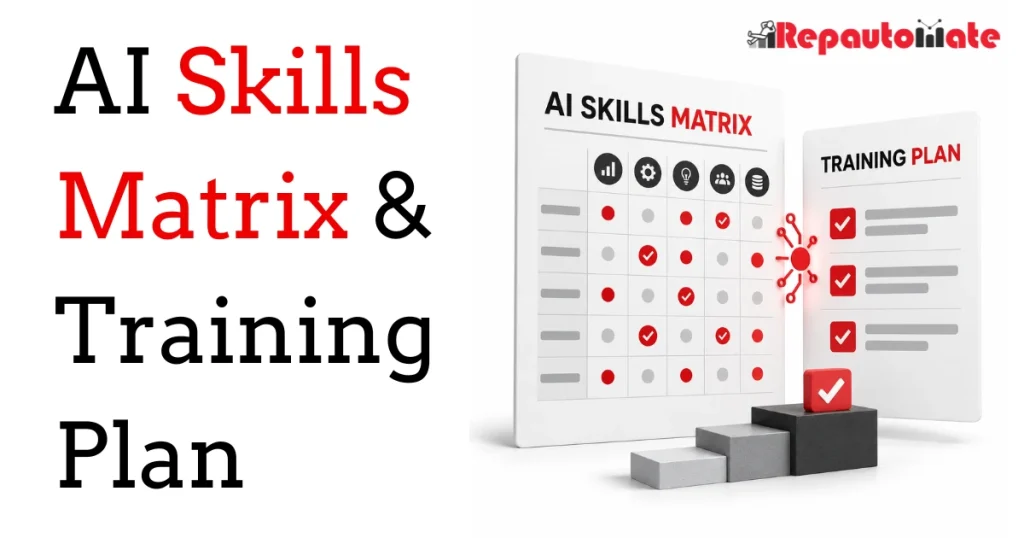
This five-page AI skills matrix and training plan covers general users, managers, system owners, governance teams and technical implementers. Available as an editable Word document and printable PDF, it provides a practical starting point for South African businesses and abroad.
Format
Editable Word + printable PDF
Contents
5 pages · 12 skill areas
Role coverage
5 workplace roles
Version
1.0 · 17 October 2026
TRAINING BASED ON RESPONSIBILITY
What This AI Skills Matrix and Training Plan Helps You Do
An employee using AI to draft a message has different responsibilities from someone approving AI-assisted decisions or connecting a system to business data. Training needs to reflect those differences.
This resource connects role expectations, practical assessment and training actions so you can identify specific gaps and decide what should happen next.
Define the skills each role needs
Use suggested competence levels to distinguish between understanding a topic, applying it in everyday work and overseeing or implementing the practice.
Assess ability through practical tasks
Use exercises to check whether people can handle information appropriately, recognise unreliable output, follow approval rules and respond when something goes wrong.
Turn gaps into a training plan
Record learning outcomes, priorities, training methods, owners, dates and assessment criteria. Follow up to confirm whether the required skill has been demonstrated.
Who Should Use This Resource?
Business owners, managers, HR and learning teams can use the template to coordinate AI skills development. System owners, governance reviewers and technical leads can help define the expectations and assess the tasks within their areas of responsibility.
The matrix covers five roles. These describe responsibilities rather than fixed job titles, so one person may hold more than one role.
| Role | Focus of the learning |
|---|---|
| General users | Using approved tools, protecting information, checking outputs and reporting problems. |
| Managers | Setting team expectations, supervising use, assessing benefits and arranging appropriate training. |
| System owners | Taking responsibility for the business use of a system, its limits, performance, support and ongoing review. |
| Governance teams | Coordinating policy, risk, privacy, security, procurement and approval requirements. |
| Technical implementers | Configuring, connecting, testing, securing, monitoring and maintaining the technical solution. |
Include relevant contractors and service providers when they use or operate AI systems on your organisation’s behalf. For specialist or high-impact work, involve people qualified to assess the relevant technical, legal or sector-specific requirements.
INSIDE THE DOWNLOAD
What Is Included in the Template?
Both formats contain the same five-page resource. The Word version can be adapted and expanded for your organisation.
1. Scope, roles and instructions
Record the team, systems and tasks being considered, assign a plan owner and identify the responsibilities each person holds.
The instructions explain how to adapt the targets, assess people, plan training and reassess their skills in the workplace.
2. Suggested role skills matrix
A matrix maps 12 skill areas across the five roles, with suggested targets and definitions for each competence level.
It explains how to handle overlapping roles, adjust expectations and record when a skill is not applicable.
3. Learning outcomes and practice tasks
Each skill area has a practical exercise to support learning and assessment, from checking an unreliable answer to reviewing supplier conditions or rehearsing an incident response.
The guidance explains how to adjust the assessment for understanding, practical application or oversight responsibilities.
4. Individual skills assessment
A reusable assessment sheet provides fields for target and current levels, gaps, priorities, evidence and findings.
It also records training actions, current task limits, supervision arrangements, agreement and the next assessment date.
5. Training plan and verification
A reusable action record connects a skills gap to a learning outcome, training method, responsible owner, planned date, resource needs and assessment criteria.
It includes space for completion evidence, reassessed skill levels, remaining restrictions and workplace follow-up, together with an illustrative training outcome and sources for further reading.
The 12 AI Skill Areas Covered
The resource covers everyday use as well as the responsibilities involved in overseeing, governing and implementing AI systems.
- AI basics and limitations.
- Approved use and accountability.
- Data protection and information handling.
- Task instructions and workflow use.
- Output checking and human oversight.
- Fairness, accessibility and affected people.
- Security, permissions and misuse.
- Purpose, impact and value assessment.
- Testing and acceptance criteria.
- Monitoring, incidents and fallback.
- Supplier review and applicable obligations.
- Documentation, change and support.
How to Use the AI Skills Matrix and Training Plan
- Start with the actual work.
Identify the tools, systems, information and tasks in scope. Decide which responsibilities each person holds, including any overlapping roles. - Adapt the target levels.
Review the suggested matrix against your organisation’s processes and risks. Add specialist skills where needed and record the reason for any skill marked not applicable. - Assess current ability.
Use discussion, observed tasks and suitable evidence. Record what the person can demonstrate rather than relying only on confidence, familiarity or course attendance. - Prioritise the gaps.
Address gaps that could expose information, enable an unauthorised action or prevent essential review before allowing independent work. Record any temporary supervision or task restrictions. - Plan the learning.
Set a specific outcome, choose a suitable method and assign an owner and date. Agree how the skill will be assessed before the training begins. - Verify and follow up.
Record training completion separately from demonstrated competence. Reassess after learning, check application in the workplace and revisit skills when the work or system changes.
A LOOK INSIDE
How the Competence Levels Work
The template uses the following scale. Levels 1 to 3 can be training targets; level 0 records a skill that has not yet been demonstrated.
| Level | What it means |
|---|---|
| 0 — Not yet demonstrated | No reliable evidence of the skill yet. |
| 1 — Understand | Explain the concept, recognise the risk and know when and where to seek help. |
| 2 — Apply | Perform the relevant task correctly and independently within approved rules. |
| 3 — Oversee or implement | Set up, evaluate or oversee the practice within the person’s responsibility, and guide others. |
A blank current rating means the person has not yet been assessed. It should not be treated as a zero gap or as evidence that training is unnecessary.
Illustrative example: protecting information
A general user understands the information-handling rules but has not yet demonstrated that they can apply them independently. Their current level is 1 and their target is 2.
Learning outcome: correctly classify five realistic sample inputs, remove prohibited details and explain the approved route for uncertain cases.
Learning and assessment: practise with a coach, then assess using fresh examples and agreed pass criteria. Record the result and any remaining restrictions.
This example is included in the resource. Adapt the practice data and assessment criteria to your tools, policies and risks.
Important Considerations When Assessing AI Skills
The suggested targets need adaptation
The role targets and assessment method are Repautomate planning suggestions. They are not mandatory proficiency levels prescribed by a standard. Adjust them for the system, task, information involved, affected people and consequences of error.
Training completion and competence are different records
Completing a course records a learning activity. Demonstrating a skill requires suitable evidence against agreed criteria. The template provides space to record both, including further action when the assessment has not been passed.
A critical gap should remain visible
A high overall score can conceal an important weakness. Assess essential skills individually and use the consequences of a gap to set its priority. For example, strong drafting skills do not compensate for unsafe information handling.
Assessment must reflect the person’s responsibilities
A governance reviewer may demonstrate a skill by evaluating whether controls are suitable. A technical implementer may demonstrate it by configuring and testing those controls. A competence level does not itself grant approval authority.
Use appropriate data and protect assessment records
Use fictional, redacted or otherwise authorised practice data. Do not enter confidential information into an unapproved AI service or place passwords and secret keys in the template. Limit access to individual assessment records.
Adaptation and professional review
This resource provides general educational guidance and a practical starting point. It does not constitute legal advice, a qualification or a certification scheme. Completion does not guarantee compliance with POPIA or any other law, regulation, contract or industry requirement. Adapt it to your organisation and obtain appropriate professional review where necessary.
FREE WORD AND PDF DOWNLOAD
Build a Training Plan Around Real Skills Gaps
Download the resource, adapt the role targets and complete an assessment for each person. Use the training record to assign learning actions and verify the results.
Version 1.0 | Five pages | The PDF is for reading and printing and is not a fillable form.
Related Repautomate Guides
Use skills development alongside clear workplace rules and a defined implementation process.
AI Policy for South African Businesses Before Staff Use AI
Consider workplace AI rules alongside your training plan so employees understand the organisation’s expectations for approved use, information handling and accountability.
Making AI Useful Inside Your Business
Explore AI system integration alongside the skills required to use, oversee and support AI within business processes.
RELATED REPAUTOMATE SERVICE
Need Help With AI Training?
The template helps you identify and organise training needs. Repautomate also offers AI training as part of its AI services.
Use your completed assessment to explain the roles, tasks and skills gaps you want to address. Discuss these alongside your tools, workplace policies and practical learning requirements to establish an appropriate training scope.
AI Skills Matrix and Training Plan Questions
An AI skills matrix maps relevant skills against workplace roles and the competence expected for each role. This resource provides suggested targets across 12 skill areas, then a separate assessment sheet for recording an individual’s current ability and gaps.
The template is designed to support different learning needs. General users need to apply the rules relevant to their work, while people overseeing or implementing systems may need deeper knowledge of testing, controls, monitoring and accountability. Adapt the targets to actual responsibilities.
Identify all relevant responsibilities. Start with the highest relevant target from those roles, then confirm it against the work the person performs. A small-business owner, for example, may also be a manager, general user and system owner.
Self-assessment is a useful starting point, but it should be supported by evidence. Use observed tasks, realistic scenarios and suitable reviewers to confirm the rating, particularly where a mistake could expose information or affect important decisions.
No. The Word and PDF versions are manual templates. The assessment instructions explain how to calculate a gap from the target and current levels. Blank ratings and approved N/A entries should not be treated as zero gaps.
The template does not prescribe a universal number of hours. Choose the training method and time after considering the person’s starting point, the skill required and the task’s risks. The training record includes fields for planned effort, resources and assessment criteria.
Agree a follow-up date and review triggers. Reassessment may be needed after relevant changes to a tool, task or policy, an incident, or evidence that a skill is no longer being applied correctly. Record the next action when an assessment is not passed.
No. It is a planning and assessment resource, not a qualification, certification audit or legal compliance assessment. Its targets should be adapted to your organisation, and specialist requirements may need additional review.
Sources and Further Reading
The resource is informed by broader AI literacy, competence and risk-management principles. The suggested role targets, skill levels and exercises are an adaptable planning method rather than a clause-by-clause mapping to these sources.
CHECK THE REST OF YOUR AI DEPLOYMENT
Training Is Only One Part of AI Readiness
Your team’s skills matter alongside the system’s permissions, data handling, test results, review points, monitoring and fallback procedures.
Download our full AI System Deployment Checklist for 36 practical checks, supporting records and a final launch decision section.